
GemPages Review (2026): Pricing, Features, Integrations & More!






Updated November 16, 2023
Our team tests eCommerce apps and publishes reviews that are unbiased and not influenced by payments we receive from some of the app developers.
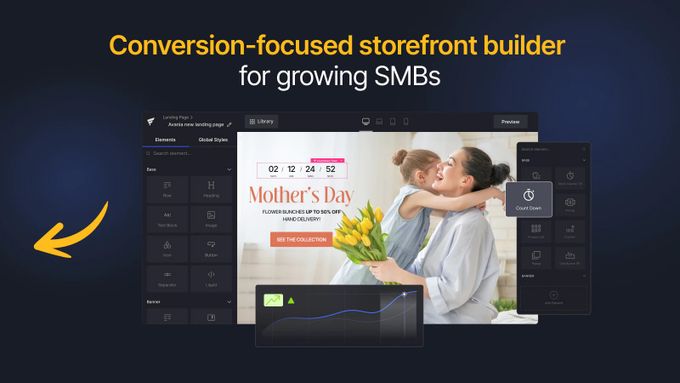
Considering you only have around 50 milliseconds to make a good first impression on your website visitors, your site's design and layout deserves special attention. From first-hand experience, we can tell you that landing pages and online store design play a significant role in driving conversions and increasing sales for your e-commerce business.
That's where GemPages Landing Page Builder comes in very handy. This tool is designed to help you create visually stunning and high-converting pages without any coding knowledge. To help you determine whether this is the best Shopify store design app for your online business, we'll explore GemPages' features, benefits, and drawbacks.
Pros
- User-friendly interface
- SEO optimization tools
- HTML/CSS editing enabled
- 24/7 chat and email customer support
- Integration with popular e-commerce platforms
- Detailed analytics
Cons
- Limited template selection
- Possible slow loading times
- Pricing structure can be confusing

Best For
GemPages Landing Page Builder is an excellent tool for small to medium-sized businesses (SMBs) using Shopify. With its drag-and-drop editor and pre-designed templates, SMBs can easily create high-quality landing pages without any coding knowledge. Additionally, GemPages provides useful features like countdown timers and pop-up windows that can increase conversions for your e-commerce business.
However, the builder is also an ideal choice for any business looking for a high level of customization, especially considering its ability to edit HTML/CSS and add custom code.
» Learn the basics for building your Shopify store's landing pages
Overview of Features
GemPages Landing Page Builder is a powerful app designed to help your e-commerce business create stunning landing pages and improve your online store's design. To make page building easy even with no coding experience, it comes packed with a range of features, including the following.
Drag-and-Drop Editor
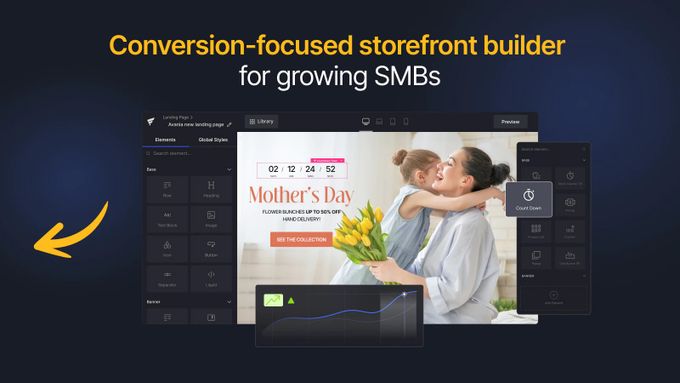
The app's drag-and-drop editor is a powerful tool that makes creating and customizing pages a breeze. With its intuitive interface, you can easily move elements around the page and add new content without using code.
We especially love how it gives you the ability to schedule page releases in advance. This feature allows you to prepare pages ahead of time and ensure they go live at the right time without having to manually publish them. If your business has limited resources or a busy schedule, this can be a game-changer for freeing up time to let you focus on other aspects of your business.
Page Variety
As an e-commerce merchant, you can use GemPages Landing Page Builder to create a range of page types for your online business, including:
- Product pages
- Collections
- A homepage
- An "About Us" page
The different page types are customizable to fit your specific needs. For example, your product pages can feature photographs, product descriptions, reviews, and add-to-cart buttons to make buying easier. On the other hand, your "About us" page can provide a corporate background to develop client trust and confidence.
By developing several kinds of pages to best highlight your brand, products, and services, you can boost your store's customer engagement and revenue.
Template Library
GemPages Landing Page Builder offers a comprehensive library of over 80 pre-designed templates, including:
- Homepage templates
- Product page templates
- Landing page templates
Since the templates are customizable, you can edit the layout, images, and text to suit your specific needs. Additionally, the app allows users to save templates for future use, enabling you to reuse the same layout and create consistency across your pages for a unified user experience.
Mobile-Friendly Design Elements
GemPages Landing Page Builder offers over 100 mobile-friendly design elements, such as image galleries, countdown timers, and video backgrounds. You can easily customize all of these to match your branding and style.
The app also includes an Instant Landing Page feature, which allows users to quickly create and launch new landing pages without needing to start from scratch. By using mobile-friendly design elements and creating responsive pages, you can improve your website's loading speed and user experience, which can ultimately lead to higher conversion rates and more sales.
» Supercharge your store's performance with the best Shopify apps for increasing sales
Tracking & Analytics
GemPages Landing Page Builder offers a comprehensive suite of tracking and analytics tools to help you optimize your marketing campaigns and store design for maximum impact. You can track metrics like page load speed, bounce rate, and conversion rate as well as perform A/B testing to understand which design aspects work best for your audience.
The app's GemMeter gives real-time metrics on page performance on mobile devices, allowing you to make the necessary improvements and boost your business growth by optimizing mobile shopping in your store.
» Boost your store's bottom line with the best Shopify analytics apps
Plans & Pricing
Depending on the features you need for your e-commerce store, you can opt for one of the four plans GemPages offers:
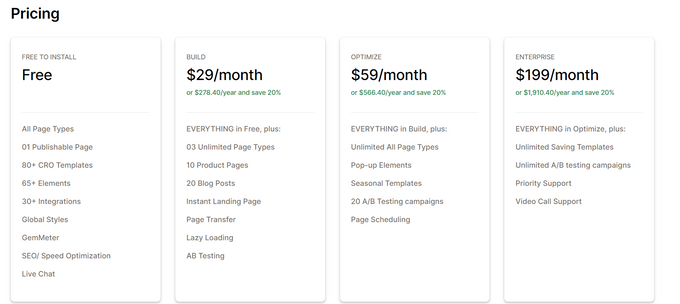
- Free Plan: If you don't need any advanced features, you can get the essentials such as over 80 templates, GemMeter, SEO optimization tools, and live chat support for free.
- Build Plan ($29/month): Suitable for businesses with campaign testing needs, the Build Plan offers everything in Free Plan plus A/B testing and other useful features.
- Optimize Plan ($59/month): Combining the features of the previous two plans with other benefits like page scheduling, the Optimize Plan is ideal for businesses with tight schedules.
- Enterprise Plan ($199/month): For bigger e-commerce businesses that require more advanced features, the Enterprise Plan offers everything from the previous plans plus features like unlimited A/B testing and priority support.
» Find out how much you should spend on Shopify apps
Integrations
GemPages Landing Page Builder integrates with a variety of third-party apps to help you create more effective landing pages that can streamline and enhance your marketing and performance efforts. This can help you convert visitors into customers, ultimately improving your online business.
These are the most popular integrations:
Usability
GemPages makes it easy to design landing pages to develop your online business and yield high conversions with its user-friendly interface and vast customization possibilities.
With its drag-and-drop builder, the program lets even non-coders construct and change landing pages easily using font and color modification and pre-made themes, while still offering HTML and CSS coding for advanced users.
In addition, GemPages connects smoothly with a range of third-party apps, making it easy to incorporate other marketing and sales tools into your landing pages.
Support
To maximize user satisfaction, GemPages provides comprehensive support options, including:
- 24/7 live chat and email customer support
- Help Center with answers to FAQs and usage instructions
- A blog on the latest trends and best practices for landing page design and optimization
- GemPages community for sharing suggestions and obtaining feedback from other users
- Tutorials on specific features
- Case studies with real-life examples of businesses successfully using GemPages to improve their online marketing efforts
Make Each Landing Page a Gem
Despite some of its cons, such as limited design options and occasional glitches, GemPages Landing Page Builder App has a range of powerful features your e-commerce business can benefit from. With its drag-and-drop editor, customizable templates, and integrations with other apps, you can easily create effective landing pages to increase conversions.
What's more, the app's capabilities like A/B testing, countdown timers, product reviews, and custom forms can help you optimize your landing pages for your specific goals and target audience, improving your store's performance and promoting growth.
GemPages Review (2026): Pricing, Features, Integrations & More!

Recommended Reviews

Stamped.io Review - Best Product Review App For 2026?
With over 4 million stores on Shopify alone, making sure your online store stands out is more important than ever. One way to do this is with a good product reviews app such as Stamped.io. Stamped.io is a highly-regarded customer marketing platform, featuring a whole heap of awesome integrated tools that help to both capture and showcase high-impact user-generated content (UGC). The app provides a platform for customers to leave reviews with star ratings and text feedback for products on your store, collects and displays these reviews/ratings and supports rich snippets for search engines to display these review ratings in search results to help boost your stores reputation and credibility. Sounds great, but is Stamped the right UGC app for you? Let’s take a look. ProsWill suit the needs of small, medium, or large sized e-commerce storesCompetitive pricing that offers excellent bang for your buckCustomer service and support is highly regardedEasy Google integrationConsSome features are exclusive for Shopify onlyThe interface can be slow to work with Best for Stamped.io is best for Shopify store owners who want to enhance the functionality of their product review section especially if they already have a high volume of customer reviews. It is an all-in-one e-commerce marketing solution which allows users to customize the appearance of their review section to match their store's branding, improve SEO with Google and social media platform integrations, and offers a range of site widgets, banners, templates and emails for maximum conversion potential. The app also offers flexibility with its pricing plans to match the goals and needs of stores of all sizes. Overview of Features Stamped.io allows users to collect customer product, photo and video reviews, making the showcasing of products and reviews on social media super easy. It also facilitates the addition of Q&A sections within your site which increases brand credibility through the sharing of real life customer experiences. Take this, in addition to the customizable on-site widgets, multilingual support, and mobile responsive themes, and you can quickly see that Stamped.io is certainly not lacking in the features department. Some more features of the app include: Review request emails: Automatically send review request emails to customers who have made a purchase on your store.Customizable emails: Customize review request emails that are sent to customers to match store branding, messaging, and design.Review generation: Allows customers to submit product reviews directly from your store or via email. You can also choose to manually add reviews from other sources such as Google, Facebook or Instagram.Review moderation: Users have control over which reviews are published on their stores, and can moderate them to ensure that they are genuine and appropriate, further enhancing brand credibility and preventing bots from spamming fake news.SEO-friendly reviews: Automatically generates SEO-friendly review content to help improve search engine ranking performance.Review widgets: Display product reviews using customizable review widgets.Review analytics: Detailed analytics on review performance, including metrics such as review submission rates, review approval rates, and more. » Unlock your store's full potential by combining product reviews with the best e-mail marketing apps Plans & Pricing The pricing plans are charged on a monthly basis, and they are: Integrations Stamped.io integrates with a wide range of different e-commerce CMS platforms and other third-party apps, including, but not limited to: Shopify and Shopify PlusWooCommerceMagentoNetoEcwidInstagramFacebookTwitterOmnisendKlaviyo Usability Stamped.io's dashboard is generally very easy to use and you don’t have to be a computer genius to navigate the app’s interface. It is designed to work seamlessly with Shopify's existing product review system and offers customization options, such as the ability to choose where the review form appears on the product page, making it more user-friendly for customers to leave reviews. It is intuitive from both a merchant and customer perspective. Support Stamped.io's customer service is highly regarded amongst users. Their support team can be reached through either live chat or email, plus they have a very comprehensive help center with a ton of helpful content and a target response time of 24 hours. Additionally, the app provides a comprehensive documentation section that covers everything from installation to customization. This documentation section includes a step-by-step guide to help users set up the app on their store and troubleshoot common issues. The Final Stamp of Approval? If you’re on the market for a great all-in-one e-commerce marketing tool, then it's hard to look past Stamped.io. The app offers competitive prices, easy-to-use interface, and wide array of features which make it a solid option for Shopify store owners who wish to take their marketing efforts to the next level. It's especially useful for store owners with an established, medium to large sized customer base which can be utilized to its maximum potential. If you operate a smaller store with a smaller customer base then you may want to look at expanding your customer base first with a good sales app so you have more customers who can leave reviews on your store.
Multi‑Location Inventory Info for Shopify: E-Commerce Inventory Management
Are you tired of not being able to tag your products based on availability and location? Then consider using a service that can solve all your e-commerce inventory management needs, like the Multi‑Location Inventory Info app by Kark Ltd. Indispensable for product pages, this app displays the exact quantities or a "high stock"/"low stock" message based on a threshold. For non-English stores, users can alter the wording, and there are comprehensive customization features with unique styles to complement any shop theme. In addition to this, Multi‑Location Inventory Info is compatible with mobile devices. ProsWorks for wide range of demographic locations14 Day free trialLots of customization optionsExcellent customer serviceConsNo free planSome users may experience compatibility issues Key Features of Multi‑Location Inventory Info Stock Availability at Each Location Show stock availability, amount, and/or a "high stock"/"low stock" message based on the quantity at your retail location. You also have the ability to block purchases from countries where an item is not in stock. Collect by Clicking On product pages, inform your customers about the availability of click and collect. Utilize Shopify's smart collection functionality to build a collection of things that are only available at a given location, or use tag filtering to offer "filter by location" features with auto-tagging. Collection Depending on Location Use the smart collection functionality to present all items available at a place and auto-tag products depending on location availability. Other Noteworthy Features The app is ideal for retailers who use Shopify's various locations or local pick-up options.You can display stock numbers of items specifically for the location linked to a client by using the "Associate a customer to location" function.Using the app's APIs, you can display stock amounts on quick-view pop-ups and featured products.The app has a responsive help center that provides speedy assistance and support. Pricing Display Plan $5.99/month This plan includes the following features: Unlimited productsInventory information on product pagesAdvanced style customization Display+ Plan $9.99/month This plan is for merchants using Shopify Plus and includes all the features from the Display plan. Multi‑Location Inventory Info Customer Reviews Customers all confirm that the app is simple to get up and running, doesn't require any code, and is easy to configure. The app comes with a risk-free 14-day trial period, and should you have any queries, the support center will attend to it quickly. Multi‑Location Inventory Info currently has a 5-star rating on the Shopify app store and is used by over 250 merchants. To see if Multi‑Location Inventory Info is suitable for your shop, visit their website and try out the demo.
HIKO Social Login by Hiko Software—Simplified Customer Registration for Shopify
One of the most frustrating things that potential customers have to deal with is having to create a separate account for every website they visit. However, this problem is rapidly becoming eradicated as more and more websites are leveraging the capabilities of integrated logins through existing accounts on popular social media services like Facebook, saving time and effort as they won't even be redirected from the page they were on. To learn more about how you can make use of this feature with an affordable and easily integratable Shopify app, continue reading this review of HIKO Social Login by HIKO Software. What Does HIKO Social Login Offer Shopify Sellers? Integration With Most Social Media Platforms The app includes support for all the popular social media services, including: GoogleFacebookAppleTwitterSnapchatTikTokDiscordetc. Customer Presence and Statistics Any users who interact with your store can be identified by their avatar from the platform they chose to sign in with, giving them a sense of presence on your site. Additionally, the app will provide you with exportable customer reports to track daily logins, browser and device usage, origin countries, and more, allowing you to cater your store to your most popular demographics. Customizable Style HIKO allows total customization of your layout and login wizard, including different sizes, shapes, and colors for your login buttons. HIKO Social Login Pricing Before committing to a monthly contract to try this service out for yourself, HIKO Software offers a free plan for their Social Login app that includes all the key features, such as 18 different social logins at 30 logins per day and even customer reports to visualize the changes. If you like the service after trying it, the extremely affordable paid plans are as follows: Professional Plan $2.49/month The additional features you'll receive by paying this monthly cost are: Unlimited loginsCustom social API keysSupport in multiple languagesCustom CSS The only drawback to this plan is that your customers will still see a "powered by HIKO Social Login" link on your store. Premium Plan $4.99/month This plan offers all the features of the other plans, as well as: Apple sign inGoogle one-tap sign inRemoval of the "powered by" link Our Verdict: Should You Use HIKO Social Login? It's frightening to think of how many customers might have been chased away from your store due to a difficult login process and mandatory account creation—just for a pair of pants. This is especially true when you consider the number of stores that already offer 3rd-party logins through social media accounts. Catching up is essential, and now you can do so easily with a Shopify app that will handle all the heavy lifting for you, allowing you to focus on your brand development and growth. If you want more confirmation, other Shopify sellers have given this app—at the time of writing this review—a solid 5 stars on the Shopify app store. Head to their website or app store page to get started. » Read our Shopify Single Sign-On review and learn how to further improve your customers' login experience