
Judge.me Reviews for Shopify (2026): Pricing, Integrations & Support






Updated February 14, 2024
Our team tests eCommerce apps and publishes reviews that are unbiased and not influenced by payments we receive from some of the app developers.
Social media has become a part of daily life and as a business owner, if you're not connected in at least some way, you risk getting left behind. Social proofing is the psychological phenomenon where people are more likely to make a purchase if they see that others have done so already but to make it work effectively, it's essential to have a good social proofing app.
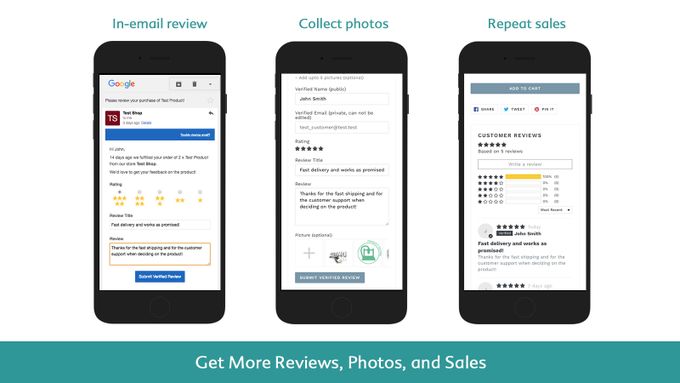
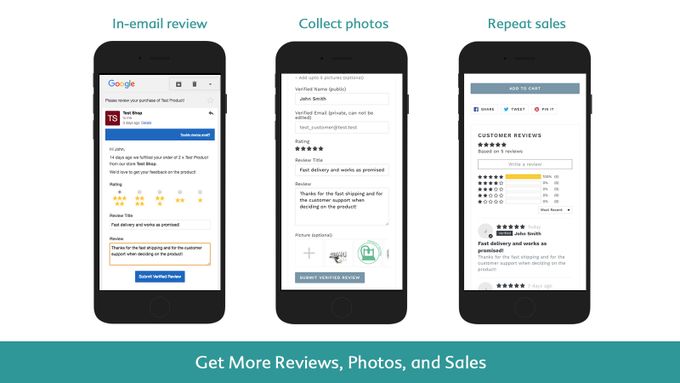
Judge.me Product Reviews is one of the best social proof apps on the market and allows e-commerce store owners to manage, display, and collect product reviews. This includes social proofing, Google Shopping, in-email review forms, product groups, rich snippets, reviews page, and a whole lot more.
With Judge.me, you can easily import your existing reviews, send review request emails to customers, and even share your reviews on social media. It also has features like review reminders, review comment management, and review analytics to help you make the most of your customer feedback.
What Is Judge.me?
Judge.me is designed specifically for e-commerce businesses on platforms like Shopify, BigCommerce, Woocommerce, Squarespace, and PrestaShop. It offers a variety of features to help online store owners collect and showcase customer reviews, including the ability to request reviews from customers via email, offer incentives like coupons, and display reviews with photos and videos.
With its focus on review management and social proof, Judge.me is a valuable tool for e-commerce businesses looking to build trust with potential customers and improve their online reputation.

What Is Judge.me Best Used for?
Pros
- Unlimited review requests
- Incentivize customers with coupons
- Free plan available
- Customizable review requests
- Automated review request emails
- Customizable review widgets and display options
- SEO-friendly reviews and rich snippets
Cons
- Free plan includes branding
Judge.me is best for e-commerce brands looking to gather, manage, and display customer reviews to boost brand credibility and target audience trust. It's also a great pick for new stores that require a free review request app.
The app is particularly useful for Shopify store owners who want to leverage user-generated content to drive sales and build customer trust. With features like photo and video reviews, customizable review requests, and the ability to offer incentives to customers, Judge.me helps businesses increase their social proof and attract more potential customers.
» Increase conversions by combining social proof and store design together
Judge.me Pricing
Judge.me has a free plan that includes basic features such as unlimited review requests, the ability to collect and display photo and video reviews, create a carousel of reviews, and add reviews to rich snippets. Their paid plan costs $15/month and includes additional features such as integration with Google Shopping and full customization options for review request emails and forms.
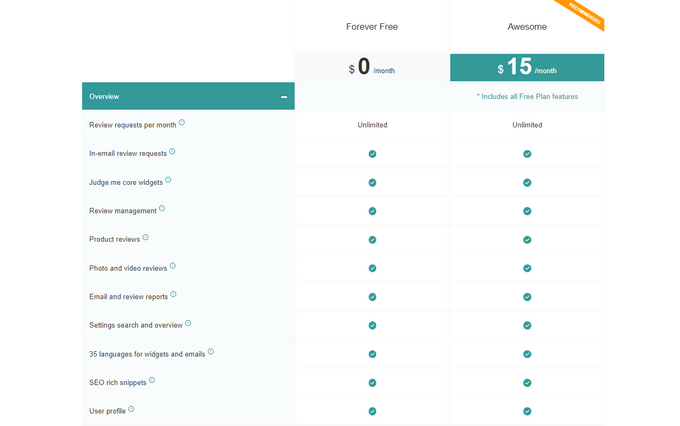
This app offers users two pricing options:
- Free Plan: The free plan offers users unlimited product review requests.
- $15 per Month: This plan offers users all the features from the Free Plan plus extra ones.
Judge.me Integrations
Judge.me integrates with a variety of platforms, including Shopify, WooCommerce, BigCommerce, and PrestaShop. It also has an open API that allows for custom integrations with other e-commerce platforms. The app offers integrations with many applications, but let's have a look at the major ones:
- Zapier
- Amplify Me
- Gempages
- Layout Hubs
- Pagefly
- Vajero
- Slack
- Push Owl
- SMSBump
- Searchanise
- BoostCommerce
- Nextopia
- Sparq
Judge.me Features
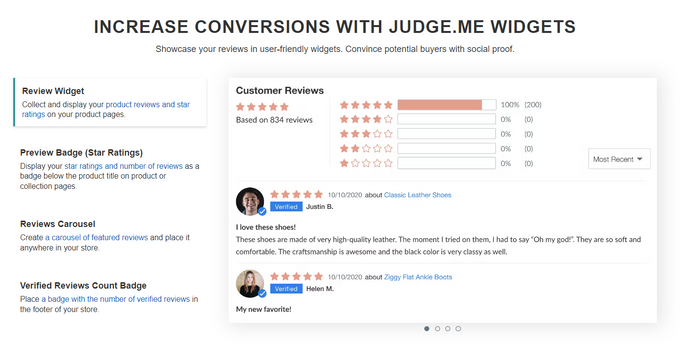
Judge.me offers a variety of features to help online stores collect and display customer reviews, including the ability to send review requests automatically, request reviews with coupons or rewards, and display reviews with photos or videos.
- Collect Reviews Automatically Schedule unlimited email review requests with photo and video and in-email review forms. Curate, reply, pin, and share reviews from the reviews dashboard.
- Customizable Widgets Customize and display reviews, star ratings, trust badges, carousel, and Q&A. Add custom questions and synchronize reviews across products and stores.
- Multi-channel Sharing Share reviews on Facebook, Instagram, Twitter, rich snippets, and Google Shopping. Engage your reviewers with coupons and email marketing integrations.
- Text and Visual Reviews Product reviews with video, photo, and text, as well as automatic reminders.
- Review Importation Unlimited review import requests and orders.
- Dedicated Review Page Judge.me offers users a single page dedicated to reviews.
- Social Media Share You can share your product reviews on various social media platforms such as Tumblr, Pinterest, Twitter, and Facebook.
- Instantly Loaded Reviews Judge.me offers instantly loaded reviews (Shopify meta fields) to boost page speed.
- Google Shopping You can add product reviews in Google shopping using Judge.me.
- Incentivize The app allows you to incentivize review requests with coupons.
Judge.me Usability
It is extremely easy to use and can be integrated with almost every other app that you use to run your e-commerce store seamlessly. This makes the app very easy to integrate into your business processes.
In addition, the app offers a range of customization options to help store owners tailor their review requests to their specific brand and audience. This includes the ability to customize the look and feel of review request emails, as well as the ability to target specific customer segments with personalized review requests.
Judge.me Support
Judge.me has an entire knowledge base page dedicated to answering usual queries from customers. They provide support through various channels, including email, live chat, and an extensive knowledge base. They also offer personalized support for both their plans, with support agents ready to reply within minutes to an email and in seconds in the chat.
Additionally, if you can't find what you're looking for there, you can send them an email directly at [email protected].
Boost Your Sales With Judge.me Product Reviews
This is a great app that allows e-commerce businesses to collect, manage, and share customer reviews about their products. Its integration feature allows users to connect to so many other applications for a smooth experience. With its affordable pricing plans and exceptional customer support, Judge.me is an excellent choice for any Shopify store looking to enhance its online presence and build trust with customers through authentic reviews.
» For more info on how to boost sales, check out our list of apps here
Judge.me Reviews for Shopify (2026): Pricing, Integrations & Support

Recommended Reviews

Custom Collections Builder: Create, Sort & Organize Shopify Collections
One of the biggest struggles that Shopify merchants have to deal with is the limited capabilities of Shopify's integrated collections builder. Your products could be grouped into so many different collections, but Shopify only has a few options to choose from. Thankfully, with an intuitive app like Custom Collections Builder by Ripple Apps, you can customize the way you group your products to better match your brand and the products you sell. Read on to learn more about how this app can help you. Why You Should Use Custom Collections Builder Many Different Types of Collections The Custom Collections Builder app allows for many customization options when building your collections. Some of the collection types include: Most sold productsRandomized productsMost visited productsReduced itemsAnd many more! Easy Product Filtering Creating your collections is super easy with the app as you have the ability to filter your products with many different tags, including the following, among others: Product typesVendorsTitlesBetween price ranges Ability to Merge Collections The app allows you to easily merge up to five collections into one. Simple Collection Sorting You can sort your collections any way you choose, such as by "most sold," to give you a clear idea of what works and what doesn't. Use this insight to create better collections for your Shopify products in the future. Additionally, you'll even be able to see and show how many times a particular product has been visited or sold. Custom Collections Builder Pricing All plans come with a 7-day free trial, and the more expensive plans allow for more custom collections and products per each collection, allowing you to scale the cost to the size of your store. The plans are as follows: Basic Plan $2.99/month 10 custom collections250 products per collectionUp to 5,000 products Enterprise Plan $4.99/month 15 custom collections500 products per collectionUp to 20,000 products Pro Plan $9.99/month 20 custom collections500 products per collectionUp to 100,000 products Pro Plus Plan $19.99/month 30 custom collections1000 products per collectionUp to 120,000 products Final Verdict: Is Custom Collections Builder Worth It? If Shopify's integrated collection-sorting system is too limited for you, then installing a 3rd-party app is essential if you'd like to give your store that extra touch of customization, and Custom Collections Builder by Ripple Apps is a fantastic choice. But don't just take our word for it. At the time of writing this review, Ripple Apps' listing on the Shopify app store held a complete 5-star rating by Shopify sellers. If you'd like to learn more, visit their website or head directly to the Shopify app store.
Reputon Customer Reviews App: Social Proof for Shopify Stores
There is no better marketing technique than social proof. When customers are deciding whether or not to purchase an item, the first thing they do is judge the state of that product's reviews on Google and different social media platforms. If your products have little to no customer reviews—or if the reviews are bad—you might as well give up hope of selling it. That's where a service like Customer Reviews Collector by Reputon can come in handy. Read on to learn more. How Customer Reviews Collector Can Help You Collect Reviews Automatically The app will automatically email a review request survey to a customer once they've received an item. If the survey result is positive, then the customer will be redirected to a reviews site of your choice—Google, Yelp, Facebook, and many more! You can even personalize these emails with your logo, text, and discount offers to persuade customers to leave reviews. Reduce Negative Reviews If the customer survey is filled out negatively, then instead of directing the customer to a reviews site, they will be redirected straight to a customer feedback form in order to contact you directly so that you can attempt to fix their issue without a negative review bringing your ratings down. Boost SEO Having many impressive customer reviews with few negative ones is great for discoverability by Google, which can increase traffic to your store and inevitable sales. Email Stat Tracking Reputon's built-in statistics will track the efficiency of your review request emails to help you fine-tune your process to enhance their benefit. Pricing All pricing plans are billed once a month in USD: Free Plan Offers all the essential features, such as: 50 emails/monthMultiple review linksCustom email templates Light Plan $9.99/month This plan offers all the features of the free plan, as well as: 150 emails/monthImport from CSVMore email templatesOption to skip POS orders Standard Plan $24.99/month This plan offers all the features of the previous plans, as well as: 500 emails/monthEmail blacklistEmail triggers for delivered and tagged orders Advanced Plan $49.99/month This plan offers all the features of the previous plans, as well as: 1,500 emails/monthAftership integrationVIP customer support Final Verdict: Should You Use Reputon Customer Reviews Collector? Developing a solid review profile with good online ratings is essential for the success of your Shopify store, and manually emailing every customer is too time-consuming. An effective automation app like Reputon's Customer Reviews Collector can leverage this amazing strategy without you having to lift a finger. But don't just take our word for it; hundreds of Shopify sellers have reviewed this app on the Shopify app store and given it an overall rating of 4.8 stars. If you'd like to learn more, visit their website or head directly to their Shopify app store page.
Blyp Review (2026): Pros & Cons, Features and Pricing
The Blyp Insights & Profit Analytics application gives a 360-degree view of your online store, providing actionable insights for businesses both big and small. The app enables you to understand the financial health, profitability, and growth of your business in real-time. With this information at your fingertips, your online business can plan better for future endeavors and drive increased profitability across your enterprise. ProsBlyp's AI helps automate and streamline data analysisSaves you time, effort, and moneyLeverage Google Analytics reportsIntegrate with third-party tools, like Facebook AdsDeep learning empowers users to make data-driven decisionsConsNo dedicated mobile app for iOS or Android Blyp Pricing 14-day free trial$29/month for all of Blyp’s features and functionalities - cancel anytime. Blyp also offers their customers an annual payment option. Get in contact with their support team at [email protected] to learn more. Customer Support Blyp’s customer support team is well-trained and can be contacted for any queries or doubts. To be as accessible as possible to their customers, the Blyp team offers round-the-clock customer support via email or live chat. Who Blyp Is Best For Blyp Insights & Profit Analytics offers solutions for e-commerce merchants of all sizes, from small retailers to large brands. Merchants can use Blyp Analytics to get a better understanding of their customers, sales, and inventory management. The app also helps users to optimize their conversion funnels and email campaigns. Features of Blyp Customized Insights Blyp is a unique platform that provides customized insights and analytics for e-commerce businesses. It helps to identify areas of improvement and track the progress of online stores. The platform also offers actionable advice and recommendations that help to boost sales and conversion rates. Compare Your Store Against Industry Benchmarks This allows businesses to see how they stack up against the competition, empowers online stores to price their products competitively, and, instead of shooting blindly into the dark, allows e-commerce merchants to make necessary changes based on actionable data insights. 24/7 Data Analysis Blyp also provides 24/7 data analysis functionalities so that online businesses can see how they are performing and make changes as needed. This helps improve conversions, sales, and customer loyalty. Blyp Ease of Use The Blyp app is extremely easy to set up and use. It takes less than a few minutes to sync the app with your e-commerce store. With a clean, easily navigated dashboard and intuitive user interface, Blyp makes analyzing and optimizing your online store accessible to any user, no matter their technical abilities. But if you get stuck, simply reach out to Blyp’s responsive team and they’ll be more than happy to help you out. The Bottom Line: Is Blyp Worth It? Getting your feet wet in the world of e-commerce is easy, but establishing your position in the market and remaining successful is more of a challenge. Thankfully, the Blyp app can help you do both. Providing e-commerce merchants with insights that they may not be on top of, such as what your customers think of your products and how you can optimize your sales channels, Blyp will help you boost your profits and grow your business faster than ever before.