
Fast Simon Review (2026): Pricing, Features, Integrations, & More!




Updated February 14, 2024
Our team tests eCommerce apps and publishes reviews that are unbiased and not influenced by payments we receive from some of the app developers.
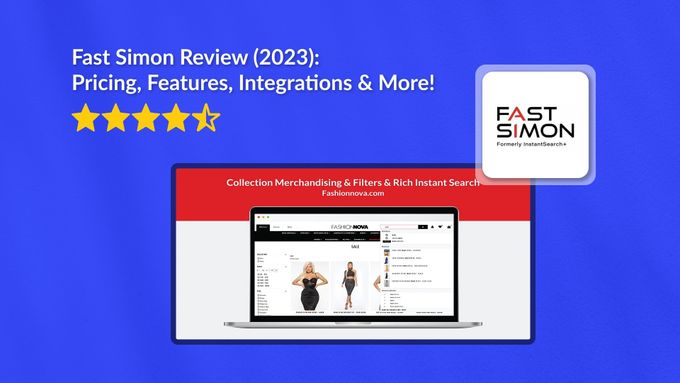
Online shopping should be an experience. All the elements of your store, from your search function to your product merchandising to your overall store design, need to work together to make each customer encounter seamless. But this doesn't just refer to convenience—you also need to make each customer feel valued by giving them a personalized journey.
This may seem like a daunting task, but don't be intimidated.
Enter Fast Simon, a comprehensive e-commerce solution that will help you optimize your customers' shopping experience. Get started with site search, personalization, merchandising, and visual discovery. Let's dive in.

Best for
Fast Simon is the ideal app for e-commerce stores looking to create a memorable search and discovery experience. With its smart collections and filters, personalization, and merchandising, Fast Simon gives you all the tools to delight shoppers while increasing your conversions and AOV. Don't worry if you don't have much technical expertise. Installing and configuring the app is simple, plus its no-code editor lets you easily create and design pages for your store.
Pros
- AI-driven solution
- Compatible with multiple e-commerce platforms
- Diverse third-party app integrations
- No-code page builder
- Free trial & plan
- 24/7 expert support
Cons
- Higher-level plans can be expensive for small businesses
Overview of Features
Fast Simon has several great features to help fortify your brand identity while building customer trust and boosting conversions. Let's take a look at the top features.
1. AI Merchandising
When it comes to merchandising, you naturally want to give specific products the spotlight—whether it's your bestsellers, new products, promotional items, or any other strategy. However, many merchants rely on guesswork when creating their merchandising strategy, which often results in missed opportunities.
Fast Simon is one of the best apps to manage bestselling products we've seen because it uses AI to take a data-driven approach to merchandising. By analyzing crucial factors like inventory, sales, margin, and more, it gives you the insights you need to make informed decisions. You'll be able to better optimize your collections, create visually captivating displays, and efficiently sort your products.
2. Personalized Customer Shopping Experiences
Today's customers are becoming more and more accustomed to personalized shopping experiences. And brands understand this: the personalization software market is expected to hit $9 billion in 2023.
With Fast Simon, you can personalize a customer's shopping experience through collections, site search, and product recommendations. It uses 1:1 AI-based personalization based on the customer's past sessions and behavior on your website, dramatically improving the accuracy of recommendations.
This means your customers are seeing what they want faster, spending less time browsing and more time buying the items they came for.
3. AI Site Search & Filters
Fast Simon's AI site search and filters help to ensure that your customers find what they're searching for as quickly as possible. This includes the Smart Collections module, which delivers AI-based recommendations across products, categories, and filters throughout your website. We think this intelligent, efficient feature makes Fast Simon one of the best conversion rate optimization apps.
At the end of the day, your customers will find what they're looking for quickly and easily, without the frustration of endless browsing and without potentially losing them due to disinterest.
4. Visual Discovery
Visual discovery is revolutionizing the way customers shop. Gone are the days of relying solely on text-based searches. Now, customers can easily find products via images.
Fast Simon's intuitive AI visual discovery suite includes features like Visual Search and Complete the Look, which enables buyers to expand their options and increase AOV.
Plus, we found that visual discovery boosted social commerce. It seamlessly integrates with your Instagram feed, letting your customers find and buy the products showcased in your posts.
5. Growth Multipliers
Fast Simon also lets you create intent-based flows that can help you expand your business. The app integrates with some of the best email marketing apps, allowing you to create tailor-made emails based on actual shopper intent.
For instance, Fast Simon's Klaviyo integration offers advanced personalization and segmentation opportunities by syncing data between the two tools. You can then leverage that information to retarget individuals who showed a clear intent to buy.
Spiceology Case Study: Increased Sales and Conversion Rates
1. Free Plan
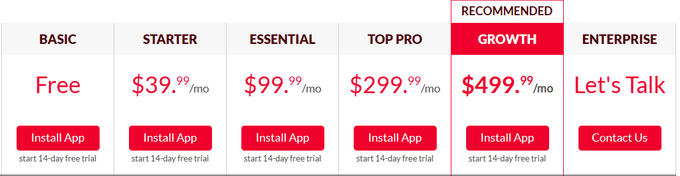
This basic package is ideal for early-stage D2C brands. It offers 100 monthly sessions and includes features like product filters, typo and auto-correction, AI-based instant search and autocomplete, and daily sync.
2. Starter Plan
The Starter Plan is geared towards small-and-medium businesses with a cost of $39.99/month. It offers everything from the Free plan plus 2,000 monthly sessions, custom product filters, synonymous and redirect, hourly sync, and 24/7 support.
3. Essential Plan
The Essential Plan is a better fit for small-and-medium businesses that are actively looking to scale. At $99.99/month, this package contains everything in the Starter Plan, plus 10,000 monthly sessions, advanced impact reports, collection filters, a retail pack, and SKU search.
4. Top Pro Plan
The Top Pro Plan is a good fit for large companies at $299.99/month. It includes 40,000 sessions, everything from the Essential Plan plus advanced merchandising features.
5. Growth Plan
The Growth Plan is Fast Simon's recommended option for clients. At $499.99/month, you get 100,000 sessions, everything in the Top Pro Plan, plus extra features like merchandising rules, landing pages, and upsell and cross-sell functionalities.
6. Enterprise Plan
This is a custom package best suited for high-volume businesses with specific needs. The plan includes all of the features Fast Simon offers.
Integrations
Fast Simon works with a range of third-party apps to help you with marketing, social proof, and landing pages:
- Tapcart: Create a mobile app for your business that syncs with your e-commerce store.
- Klaviyo: Create personalized email marketing campaigns to engage and nurture your audience.
- PageFly: Design and optimize landing pages for improved user experience and higher conversion rates.
- Langify: Reach a global audience by translating your Shopify store while boosting your SEO at the same time.
- Attentive: Increase conversions and sales with personalized SMS marketing campaigns.
- Judge.me: Easily gather and showcase customer reviews and ratings to enhance trust and social proof.
- Yotpo: Collect and leverage customer reviews, photos, and Q&A to drive sales and build brand loyalty.
Usability
Setting up an app for your Shopify store might seem overwhelming, but with just a few clicks, Fast Simon can enhance your visitors' experience by configuring collection merchandising and filters.
The best part is you don't need any coding skills to use Fast Simon. Whether you're a newbie or an expert, you can create personalized shopping experiences easily thanks to the app's drag-and-drop editor and pre-built templates. Finally, making any changes and optimizations is a breeze with Fast Simon's user-friendly interface.
One of the best onsite search Apps I have used in my career. Tons of features and customizations that any user can take action on. — Shopify review from Bodybuilding.com
Support
When it comes to Fast Simon support, users can rely on a range of channels, including email and phone, with 24/7 availability. Additionally, Fast Simon provides valuable resources to help you master the app effectively, including:
- Blog and articles: Gain insights and stay updated with informative blog posts on creating an optimized e-commerce experience.
- Community: Engage with other Fast Simon users, gaining experiences and valuable tips.
- Wiki-pages: Access dedicated wiki pages that delve into merchandising and personalization strategies.
- On-site pop-up support video: Benefit from an on-site video resource that lets you start an audio conversation with the Fast Simon team.
Instant Search for Fast Customer Experiences
E-commerce is competitive, and customers expect a lot from their online experience with you. From personalized product recommendations and communication to quick and relevant search results, you need to tick all the boxes to win customers over. Fast Simon is a unique solution that understands this. Its powerful features can help you enhance your customers' shopping experiences while also increasing your conversions and revenue.
Fast Simon Review (2026): Pricing, Features, Integrations, & More!

Recommended Reviews

Multi-Store Sync Power Review: Inventory Sync for Shopify
Managing a Shopify store can be challenging. Managing multiple stores using the same inventory can seem near impossible. The Multi-Store Sync Power app by EGNITION automatically synchronizes and updates inventory information in real-time through a two-way channel across multiple Shopify stores when products are stocked, sold, returned, or removed. Key Features of Multi-Store Sync Power Multi-Store Power Sync has an abundance of features that are available to all users, regardless of their chosen plan. Some key features include: Real-Time Sync for All Linked Stores The app automatically updates inventory in all of your linked stores whenever there's a new order, refund, or cancellation. You can also effortlessly create and update products and product collections in all of your connected stores. A considerable number of fields are supported, including product images.Create Custom Products Pricing Maintain full control over your pricing structures when you create custom pricing rules. This is especially useful if you have different pricing strategies between stores.Easy Configuration You can connect your Shopify stores using a unique key, ensuring that your SKUs or barcodes are correct across different shops. This feature helps you find any unlinked products in your stores.Multi-Location Support You have the liberty and flexibility to sync inventory based on location instead of on the actual store. ProsSynchronized inventory management across multiple storesStreamlines POS system across locationsQuality control over SKUs and barcodesCost-friendly monthly pricing7-day free trialOutstanding customer supportConsCan have issues with syncing individual itemsConfiguration can be confusing for less tech-savvy users » Sync inventory between two Shopify stores with the best multi-store inventory management apps Who Is Multi-Store Sync Power Best for? Multi-Store Sync Power is specifically designed for merchants running multiple stores. This includes merchants who: Run multiple Shopify accounts after expanding to an international clienteleOwn and sell multiple brandsAre dropship store ownersWant to separate B2C and B2B channelsAim at targeting different customer segments Pricing Plans Multi-Store Sync Power's pricing plans are based on the number of products per connected store. These plans are broken into five pricing categories, including a free plan and a 7-day free trial. All of the app's features are included in every plan. You're only limited in terms of the number of products per connected store. Bronze PlanFree0-25 products per store Silver Plan$19.99/month26-100 products per storeGold Plan$29.99/month101-1,000 products per storePlatinum Plan$49.99/month1,001-5,000 products per storeRhodium Plan$99.99/month5,000+ products per store » Here's how to determine how much to spend on Shopify apps Usability Thanks to the magnitude of features and functionalities offered by Multi-Store Sync Power, setup can become confusing if you're less tech-savvy. However, customer support is outstanding and dedicates itself to assisting new and old users with setup and integration issues. Once the app has been correctly set up, using the software is simple and intuitive, thanks to a simple yet informative dashboard that allows you to manage all your stores in a single location. » Find out how Multi-Store Sync Power compares to Connected Inventory Customer Support Egnition is well known for its high level of customer support, and things are no different with the Multi-Store Sync Power app. Offering a 24/7/365 support team, any issues with the app can be quickly addressed. Members of the support team are skilled and efficient and go out of their way to respond accurately and timely to any presented problem. The support team can be contacted via the chat icon on the app's dashboard, or you can send an email to [email protected]. Bottom Line: Is Multi-Store Sync Power Worth It? Managing multiple Shopify stores manually is not only time-consuming but creates a large space for human error. As Multi-Store Power Sync automatically updates and syncs collections, prices, and products across multiple stores, you can dedicate your time to other aspects of your business. Multi-Store Sync Power will suit both new and old Shopify store owners who wish to streamline cross-store data. If you dropship, wish to expand to a global audience, want to separate B2C and B2B channels, or simply run multiple brands with the same products, you may want to consider connecting your stores with Multi-Store Sync Power.
EasyRoutes for Shopify: E-commerce Tracking & Delivery Management
Managing safe, reliable, and efficient delivery of your products without stress seems like an impossible task. Fortunately, an efficient delivery management app makes the processes involved simple for any Shopify seller. EasyRoutes is a dispatch and delivery tracking app that takes your Shopify orders and converts them into optimized local delivery routes with itemized inventories that are easy to share with your drivers or hassle-free when you have to deliver products yourself. Why You Should Use EasyRoutes EasyRoutes shows signs of being an all-in-one fulfillment solution that could potentially save you hours of time planning and optimizing the quickest delivery routes. The app integrates seamlessly with Shopify and your store's orders, removing the need to import and export spreadsheets. Users select the orders for delivery, and the app intuitively determines the most efficient route to deliver your products, complete with packing lists. EasyRoutes Features Let's dive into the highlight features of EasyRoutes: Route Optimization One of EasyRoutes' advantages is the ability to optimize your routes. Apply handy filters, use tags, and search to find the exact orders you want to deliver. Afterward, you only have to click a button to add your selection to your route staging area. Once all your orders have been selected, EasyRoutes will optimize your addresses and output a map, stop list, and route inventory you can use as a packing list. Making adjustments to your route, should you receive a last-minute order, is painless - simply add it to a route you've already created. It's also a breeze to make changes with EasyRoutes' full suite of editing tools. Once all routes have been made, EasyRoutes instantaneously optimizes it to be the shortest and fastest one available. Driver Apps Delivery Driver is EasyRoutes' IOS and Android app for your driver (or yourself, if you do your own deliveries). It equips your driver with the tools they need to focus on one delivery at a time. Drivers can mark orders as Out for Delivery, Delivered, and Missed Delivery. With EasyRoutes' easy integration with Shopify, all order updates your driver makes sync automatically with your store's backend. Additional handy features include integration with any navigation app (Google Maps, Apple Maps, or Waze), attaching notes, taking photos, and capturing a signature as proof of delivery. EasyRoutes' Delivery Driver also gives your drivers the ability to see any critical order and delivery notes and the contents of the order they are delivering. On top of this, they can also call or text a customer with the tap of a button. Other Noteworthy Features Proof of delivery Attach proof of delivery photos, e-signatures, and notes to your orders for peace of mind.Customer tracking links Customers can use a customizable tracking link to monitor their deliveries and receive notifications for all delivery events. ETAs and drive times Manage expectations by keeping an eye on estimated drive and arrival times.Route scheduling Schedule routes for dispatch at a specific day/time in the future, complete with accurate ETAs.Route inventories Before embarking on a delivery, EasyRoutes features a packing list to ensure you have everything you need. EasyRoutes Customer Reviews The reception from the public has been rather positive, claiming that the app provides users with superb usability, an intuitive interface, and effortless customizability. It has maintained a solid 4.8-star rating on the Shopify app store with numerous customer reviews. To see if EasyRoutes is right for your shop, visit their website to learn more or to start your free trial.
Traffic Boost for Shopify: Boost Organic Traffic Through Word-Of-Mouth Marketing
Word of mouth is one of the most effective marketing techniques that businesses can utilize. Potential customers are far more likely to purchase something if one of their peers has purchased the same product and validated its quality. This is exactly the kind of benefit you can achieve when you use a service like Traffic Boost by BERMUDAPPS. This handy app can help you leverage your customers to do your social proofing for you by offering them incentives to share what they bought through social media, saving money on ad spending and boosting your conversions at the same time! Traffic Boost Highlight Features Automated Requests The app will automatically send marketing request emails with discount codes to customers once they complete purchases on your store, meaning that you never have to lift a finger after the setup. Customizable Pages The "thank you" and "discount" pages sent to your customers are totally customizable to fit your brand's personality and voice. Save Money on Ad Spending Why waste money on social media ads when your customers can do it for you for less cost and greater effectiveness? Customers can share your product through direct messages, Facebook stories, and everything in between. Seamless Installation and Integration With all the parameters pre-filled and easily modifiable, you can have the service up and running on your Shopify store minutes after the one-click installation. Traffic Boost Pricing All the paid plans come with a 14-day free trial, allowing you to test the service before committing. Free Plan This is a test plan that lets you get a feel for the service without paying for it first. It offers the following features: Customizable "thank you" and "discount" pagesCustomizable post-purchase emailsConversion stats and tracking24h chat support Starter Plan $3.99/month This plan offers all the features of the Free Plan, as well as: 1-50 orders after the free trialLive chat support Advanced Plan $9.99/month This plan offers all the features of the previous plans, as well as: Up to 200 monthly store orders Pro Plan This plan offers all the features of the previous plans, as well as: Up to 1,000 monthly store orders Our Verdict: Should You Use Traffic Boost? Utilizing the most effective marketing technique without having to lift a finger is a no-brainer, and this is exactly what you'll get when you use Traffic Boost by BERMUDAPPS. Doing so will save you time, effort, and money while boosting your conversions and customer loyalty. It's no surprise that, at the time of writing this review, the app has maintained a solid 5-star rating on the Shopify app store. If you'd like to learn more, visit their website or head directly to their listing on the Shopify app store.