
Core Web Vitals Booster By Speedien—Improved SEO and Page Speed for Shopify Stores




Published May 19, 2023
Our team tests eCommerce apps and publishes reviews that are unbiased and not influenced by payments we receive from some of the app developers.
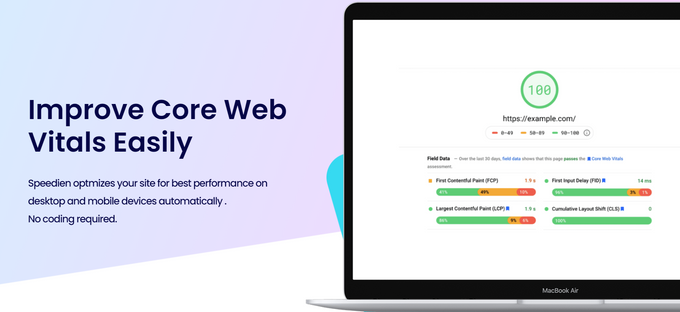
There are many different aspects that contribute to a website's overall SEO quality. Improving your Google discoverability takes more than just high-performing keywords placed strategically—you have to consider your site's page speed too. Websites and pages that have slow load times will be flagged by the Google Search Console, lowering your authority and making it less likely that potential customers will discover your store.
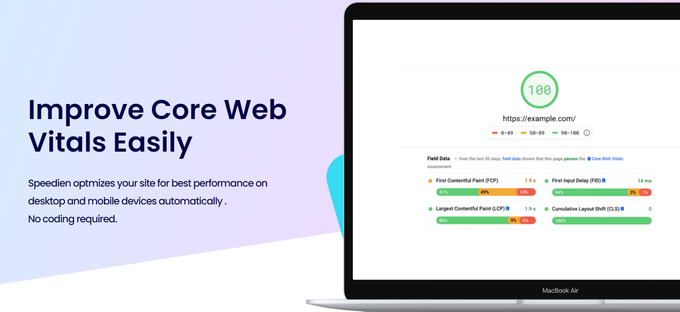
Thankfully, you can improve your site's load speed without having detailed knowledge and experience in coding. If you'd like to start taking steps to improve your site's load speed, look no further than Core Web Vitals Booster, a Shopify app developed by Speedien.
Pros
- No coding experience required
- Intelligent Javascript loading
- 24/7 support
- Lots of popular app integrations
- Works for desktop and mobile devices
Cons
- Can take time to see results
- Some users may have compatibility issues

What Is Core Web Vitals Booster Best For?
Most Shopify sellers improve their loading speeds by optimizing the size of their images—or other similar tactics—without realizing the negative impact of having multiple different Shopify apps interfering with your store's code and slowing the process down.
Although Speedien's app optimizes your images and backend code, Core Web Vitals Booster excels in deferring third-party scripts and apps from activating until they're required, letting Google load the important stuff first. It works with all the most commonly used apps and even provides daily speed reports to allow you complete monitoring control. The cloud-based caching also helps you to quickly implement your frontend code.
» Learn the basics of optimizing a slow-loading Shopify store
Overview of Features
Core Web Vitals Booster is loaded with features to help improve page loading speeds. These include but are not limited to;
- Cloud-based caching: Frontend code is delivered using cloud-based cache for improved time to first byte (TTFB).
- Global CDN compatibility: Global CDN, HTTP/2 Compatibility, including GZIP and Brotil compression. This can help enhance an online store's scalability and increase global reach by handling high levels of traffic during peak times.
- HTML & CSS optimization: Advanced HTML optimization, critical path CSS generation, script optimization for increased SEO ranking, and improved site performance, especially on mobile devices.
- Image optimization: Responsive image sizing, lazy loading, and automatic WebP conversion.
- JS optimization: Progressive loading of third-party scripts to minimize impact on page speed.
- Daily speed reports: Daily report of core web vitals including alerts if the vitals change drastically.
Plans & Pricing
Speedien's app only offers one pricing plan at $9/month but allows a 7-day free trial to try out the service before committing to anything. This ensures you get all the features and 24/7 customer support you need without spending a fortune on premium pricing plans.
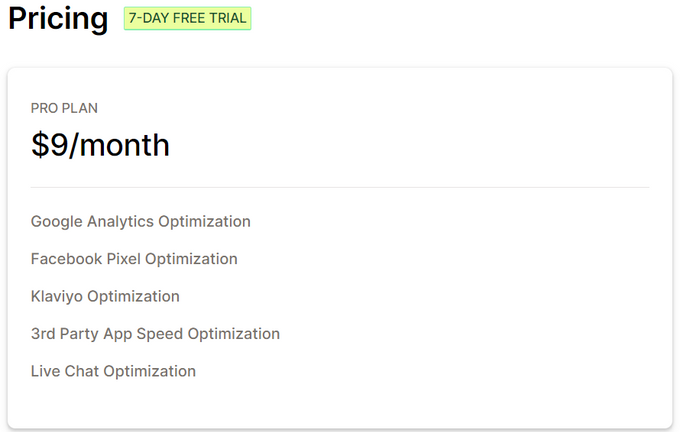
Other useful features included in the plan are:
- Automatic theme optimization
- Unlimited image optimization
- Unlimited pageviews
- Critical CSS generation
- CSS lazyloading
Integrations
The app integrates with a number of different platforms and plugins, and can help with Facebook pixel speed optimization, Klaviyo speed optimization, Google Analytics / Tag Manager speed optimization, and intelligent Javascript loading for Shopify apps. It can also help with live chat optimization provided your store has that functionality.
Core Web Vitals Booster integrates with three of the best CMS providers i.e. WooCommerce, WordPress, and Shopify.
Usability
Core Web Vitals Booster is relatively straightforward to use. E-commerce merchants must simply enter their domain name and a preview domain will be generated so all the optimizations can be viewed before going live. Once you're happy with the changes, point your domain name to the CDN IP and the optimizations will take effect for increased page loading speed and improved site performance.
Support
Speedien offers 24/7 support for any queries that you may have while using the app. The quickest way to reach them is via e-mail [email protected] but there is also an FAQ section on their website which can help with common issues.
A Vital Organ For Shopify Stores?
Not only can poor page speed hurt your SEO rankings and discoverability, but it's also sure to annoy and chase away potential customers. And while optimizing your images or preloading pages can speed your site up, it won't help you get around the inevitable lag of accumulating necessary apps.
Instead of spending time and effort trying to code your way out of a bogged-down store, let an efficient service like Core Web Vitals Booster by Speedien do the work for you. We found that most users will see an improvement in site performance almost immediately and while some users may experience slight compatibility issues, the 24/7 support team is there to help and resolve issues quickly and efficiently.
Core Web Vitals Booster By Speedien—Improved SEO and Page Speed for Shopify Stores

Recommended Reviews

Transcy Review (2026): Pricing, Features, Integrations, & More!
Did you know that the globalization of e-commerce is rapidly expanding, with a projected value of $6.51 trillion by 2023? However, language and currency barriers are a major problem for businesses looking to expand to other countries and regions. In fact, according to a study, 76% of online shoppers prefer to purchase products that include information in their native language. This is a mammoth obstacle to stores looking to expand globally. This is where Transcy comes in—a language translation and currency converter app designed to help businesses overcome this language barrier. Transcy allows merchants to translate their stores' content into multiple languages and provide real-time currency conversion, making it accessible to a much wider audience. In this review, we’ll take a closer look at Transcy, its pricing, features, integrations, and more to help you make an informed decision about whether it's the right tool for your business. ProsEasy-to-use interfaceUnlimited word translationsAuto geolocation detection systemIntegrates with many e-commerce toolsGreat value for moneyConsCustomization takes some time Best For At its core, Transcy is an essential tool for any Shopify store looking to expand into new countries or regions. We believe this app is useful for merchants of any size or category who want to offer their products to customers who speak different languages and use different currencies. Transcy is particularly relevant for stores that don't have the budget to hire a translator, as it offers affordable language translation and currency conversion solutions. With Transcy, any Shopify store can become a global business without breaking the bank. Overview of Features Geolocation Autodetection Transcy's geolocation autodetection feature automatically identifies the customer's location and displays the corresponding language and currency—providing a personalized shopping experience to each customer.AI-Language Translation With AI language translation, Transcy supports over 110 languages and translates an unlimited number of words across all types of pages, including product, collection, and checkout pages, blogs, articles, and third-party apps. The fast translation speed and the ability to edit and customize translations make it an efficient tool for merchants.Automatic Currency Converter Transcy's automatic currency converter supports over 160 currencies and updates the exchange rate several times a day. It can convert any price, including product prices, shipping fees, taxes, and more.Image Translation Image translation means different pictures, like banners, are used for different language groups. The app auto-inspects these elements and replaces them with something more contextually appropriate. Not only does this grab the shopper's attention, but it improves the customer experience by showing an appreciation for the local context.Customizable Language & Currency Switcher Transcy's customizable language and currency switcher offers many template designs and can be edited to match the store's branding and theme. It has different settings for mobile and desktop devices and does not affect site speed.Multilingual SEO Transcy translates meta tags, such as titles, descriptions, and alt tags, in all targeted languages to improve on-page SEO to drive more traffic to your store. » Looking for more ways to boost traffic? Check out these top SEO apps Plans & Pricing Transcy offers a 14-day free trial and four pricing plans to choose from, all of which offer unlimited words for AI translation. Free This plan is free to install and includes unlimited words for AI translation. It offers basic switcher settings, translations for one language and one currency, and support for third-party-app translations. Additional expert service is available on demand.Basic The Basic Plan costs $11.90 per month. It includes all features of the Free Plan, translations for two languages and 167 currencies, and the ability to edit translations for one language. Growth At $29.90 a month, the Growth Plan includes all the features of the Basic plan but also allows for translations in 111 languages and the ability to edit translations for up to five languages. Additionally, it offers a glossary, basic auto-update translation, and language redirection.Premium The Premium Plan tops the list at $59.90 per month. It allows for translations in unlimited languages and the ability to edit translations for up to 20 languages. It also includes advanced auto-update translation, a priority server, and a dedicated customer success manager. Integrations Transcy offers a range of third-party app integrations that are especially useful for businesses looking to expand their online presence globally. By translating and localizing various aspects of the site—including size guides, reviews, sales pop-ups, and trust badges—Transcy helps ensure a seamless customer experience across all touchpoints. Some of the most popular integrations include: Judge.mePageFlyLooxAli ReviewsPickyStory These integrations allow store owners to streamline their translation process and provide an even more personalized shopping experience for their customers. Usability Usability is one of Transcy's biggest strengths. The setup process is straightforward and easy to navigate. Plus, the user interface is clean, modern, and intuitive, making it easy to find what you need. You don't need any coding or technical knowledge to use Transcy, which is great for users who aren't familiar with website development. Transcy is accessible to everyone, including those new to website translation and localization. Support Transcy provides comprehensive customer support through their 24/7 live chat and email support. The platform offers support in 10 languages, including English, French, Spanish, German, and Japanese. Plus, the Growth and Premium Plans come with an onboarding specialist to help users get started, while the Premium Plan offers a dedicated customer success manager to ensure users have the best possible experience. Speak Your Customers' Language for Sales Success Despite some shortcomings, like customization taking time, Transcy offers powerful features that make it an excellent choice for businesses looking to expand their global reach and improve their customer experience. With its advanced AI translation capabilities, intuitive user interface, and robust set of integrations, Transcy has the potential to do great things for businesses of all sizes. By speaking your customers' language, you can improve engagement, build trust, boost traffic, optimize conversions, and ultimately, drive more sales. » Check out our list of the best translation apps to see some great alternatives
Happy Birthday Email Discounts App Review (2026): Automated Email Marketing For Shopify
Are you tired of seeing low open rates and conversions on your email marketing campaigns? Well, did you know that personalized emails can increase open rates by 29% and click-through rates by 41%? What's more, 88% of people agree that they'll respond favorably to an email that's been specially created for them. One strategy for personalizing your emails is to send customers happy birthday emails. If this sounds intimidating to you, you're in luck. Happy Birthday Email Discounts is a Shopify app that handles all the logistics involved in collecting customer details and sending personalized emails with unique discounts to your shoppers on their birthdays. In this review, we'll take a closer look at Happy Birthday Email Discounts's features, pricing, customer support, and more to help you decide if it's the right app for your business. ProsExtensive customization optionsSeamless integration with ShopifyDetailed analytics for tracking performance metricsFree trial period for testing & evaluationAffordable pricing options for stores of all sizesConsCustomer support limited to UK office hours Best For Happy Birthday Email Discounts is an app that will benefit any e-commerce store looking to set up or improve its email marketing campaign through sending personalized emails. There are several plans to choose from, making it a good choice for small, medium, and large businesses. More specifically, the app is an excellent marketing tool for stores selling items frequently bought as birthday gifts like jewelry, perfume, or clothing. Happy Birthday Email Discounts is also a very helpful app for e-commerce businesses with a strong customer relationship management (CRM) system in place. The app will enable them to easily track and manage customer birthdays and automate the email-sending process, saving them a lot of valuable time and resources. Overview of Features Happy Birthday Email Discounts boasts an extensive range of features that cater to businesses of all sizes. The main features include: Automated Birthday Emails The feature most central to the app is its ability to automatically send personalized emails to customers on or leading up to their birthdays. By using this feature, businesses can keep customers engaged and loyal while also increasing revenue. Customizable Email Templates The app offers customizable email templates, providing businesses with a wide range of themes to choose from. With this feature, merchants can easily create beautiful, on-brand emails that captivate their audience and inspire action. You can also personalize the subject line and body of the email for a one-of-a-kind email that'll leave your customers feeling valued on their special day. Customer Birthdate Collection This feature allows businesses to quickly and easily capture their customers' date of birth at multiple touchpoints. You can choose to ask for the customer's birthdate on a custom landing page, the order status page, Shopify POS, sign-up forms for newsletters, or the user account creation page. Unique Discount Codes With Happy Birthday Email Discounts, you can easily set up a unique discount landing page. Customers will be given the link to this discount page in the birthday email. When shoppers click the link, a unique, single-use discount code will be displayed. There are multiple discount settings to choose from, like the discount type, amount, code prefix, expiry date, and limitations like minimum spend and qualifying products. This Shopify discount app also gives you the option to create discount codes manually. Follow-Up Emails This is the app's newest feature, which allows you to automatically send a second email after a specified number of days or just before the discount is set to expire. It will only send the follow-up email if the discount has not yet been redeemed. You can choose whether to maintain the same style and design as the original email, or you can create an entirely new style. This feature gives customers that extra nudge to make a purchase before the offer expires. Performance Analytics Happy Birthday Email Discounts has a dedicated analytics dashboard to show you your campaign statistics, including where the birthdates were collected from, the open rates, click-through rates, the total number of discounts sent, and conversion rates. It also provides a graphical representation of this data to track your performance at a glance. » For improved business insights, head to our list of the top sales-tracking apps Plans & Pricing Happy Birthday Email Discounts offers four pricing plans. Essentially, they all offer the same set of features we discussed above. The difference lies in the number of customers it supports, with cheaper plans better suited to smaller customer bases. Starter The Starter Plan is free and includes essential features such as automated birthday emails, customizable templates, and performance tracking. It only supports 50 birthday members, which makes it quite limited. However, it's a great starting point for smaller stores just starting out.Base The Base Plan costs $10 per month and offers all the features listed in the Starter Plan. However, it stores up to 1,000 birthday members, offering a lot more than the Starter package at an affordable price.Growth While the Growth Plan is double the price of the Base Plan, at $20 a month, it supports five times the number of birthday club members. This makes it an excellent fit for medium-sized businesses. Established As the name suggests, the Established Plan is ideal for larger stores with a more established customer base. It comes with a price tag of $40 a month but stores an impressive 15,000 birthday members. If your needs go beyond this, the Happy Birthday Email Discounts team will develop a custom plan to cater to more than 15,000 members. » Not sure what you should be spending? We offer helpful guidelines on how much to spend on Shopify apps Integrations Happy Birthday Email Discounts integrates with a variety of third-party apps to streamline and enhance your marketing and performance efforts. With these integrations, you can easily sync your customer data and automate your email campaigns. Some of the most popular integrations include: Privy: This integration allows you to add a birthday field to your existing Privy popups.Klaviyo: You can use Happy Birthday Email Discounts to collect customer birthdate information and export it directly to one of your Klaviyo lists.Omnisend: Like Klaviyo, the Omnisend integration allows you to transfer your birthdate data straight to your Omnisend list.MailChimp: Happy Birthday Email Discounts integrates with MailChimp much in the same way as Klaviyo and Omnisend.SMSBump: This is an exciting integration that lets you send birthday messages and discounts using SMS in addition to email. Usability Getting started with Happy Birthday Email Discounts took a matter of minutes. The installation process is simple and efficient, and the settings are easy to configure—even for people without a tech background. The app's user interface is intuitive, clean, and easy to use, making it accessible for businesses of all sizes. Happy Birthday Email Discounts offers a range of customization options, allowing you to create tailored email templates that match your brand and messaging. The app also integrates seamlessly with other apps, allowing for streamlined marketing efforts and data syncing. Overall, the automation of birthday emails has saved us a lot of time and resources, allowing us to focus on other aspects of our marketing, all while improving our customer loyalty and sales. » Check out our top choices for sales-boosting apps to ramp up your bottom line Support Happy Birthday Email Discounts provides excellent customer support that ensures businesses can easily achieve their marketing goals. Support includes: Email support: You can submit a request form about any issue you're experiencing with the app. They typically respond on weekdays during UK business hours, although they do sometimes offer assistance outside of these hours.Support portal: This portal contains an extensive library of articles, including how to get started, configuring settings, integrating third-party apps, plans and pricing, and FAQs.Case studies: These are real-life examples of businesses using the app to improve engagement and customer lifetime value. Wish Every Customer a Happy Birthday! Happy Birthday Email Discounts is a powerful tool that enables businesses to create personalized birthday email campaigns for their customers. Despite some limitations in terms of performance, the app offers a range of features to help stores increase customer engagement and drive sales. With the app's user-friendly interface and detailed analytics, businesses can easily create effective birthday email campaigns that will increase customer loyalty and boost revenue. » Take a look at the best email marketing apps to drive your campaigns even further
Fast Simon Review (2026): Pricing, Features, Integrations, & More!
Online shopping should be an experience. All the elements of your store, from your search function to your product merchandising to your overall store design, need to work together to make each customer encounter seamless. But this doesn't just refer to convenience—you also need to make each customer feel valued by giving them a personalized journey. This may seem like a daunting task, but don't be intimidated. Enter Fast Simon, a comprehensive e-commerce solution that will help you optimize your customers' shopping experience. Get started with site search, personalization, merchandising, and visual discovery. Let's dive in. Best for Fast Simon is the ideal app for e-commerce stores looking to create a memorable search and discovery experience. With its smart collections and filters, personalization, and merchandising, Fast Simon gives you all the tools to delight shoppers while increasing your conversions and AOV. Don't worry if you don't have much technical expertise. Installing and configuring the app is simple, plus its no-code editor lets you easily create and design pages for your store. ProsAI-driven solutionCompatible with multiple e-commerce platformsDiverse third-party app integrationsNo-code page builderFree trial & plan24/7 expert supportConsHigher-level plans can be expensive for small businesses Overview of Features Fast Simon has several great features to help fortify your brand identity while building customer trust and boosting conversions. Let's take a look at the top features. 1. AI Merchandising When it comes to merchandising, you naturally want to give specific products the spotlight—whether it's your bestsellers, new products, promotional items, or any other strategy. However, many merchants rely on guesswork when creating their merchandising strategy, which often results in missed opportunities. Fast Simon is one of the best apps to manage bestselling products we've seen because it uses AI to take a data-driven approach to merchandising. By analyzing crucial factors like inventory, sales, margin, and more, it gives you the insights you need to make informed decisions. You'll be able to better optimize your collections, create visually captivating displays, and efficiently sort your products. 2. Personalized Customer Shopping Experiences Today's customers are becoming more and more accustomed to personalized shopping experiences. And brands understand this: the personalization software market is expected to hit $9 billion in 2023. With Fast Simon, you can personalize a customer's shopping experience through collections, site search, and product recommendations. It uses 1:1 AI-based personalization based on the customer's past sessions and behavior on your website, dramatically improving the accuracy of recommendations. This means your customers are seeing what they want faster, spending less time browsing and more time buying the items they came for. 3. AI Site Search & Filters Fast Simon's AI site search and filters help to ensure that your customers find what they're searching for as quickly as possible. This includes the Smart Collections module, which delivers AI-based recommendations across products, categories, and filters throughout your website. We think this intelligent, efficient feature makes Fast Simon one of the best conversion rate optimization apps. At the end of the day, your customers will find what they're looking for quickly and easily, without the frustration of endless browsing and without potentially losing them due to disinterest. 4. Visual Discovery Visual discovery is revolutionizing the way customers shop. Gone are the days of relying solely on text-based searches. Now, customers can easily find products via images. Fast Simon's intuitive AI visual discovery suite includes features like Visual Search and Complete the Look, which enables buyers to expand their options and increase AOV. Plus, we found that visual discovery boosted social commerce. It seamlessly integrates with your Instagram feed, letting your customers find and buy the products showcased in your posts. 5. Growth Multipliers Fast Simon also lets you create intent-based flows that can help you expand your business. The app integrates with some of the best email marketing apps, allowing you to create tailor-made emails based on actual shopper intent. For instance, Fast Simon's Klaviyo integration offers advanced personalization and segmentation opportunities by syncing data between the two tools. You can then leverage that information to retarget individuals who showed a clear intent to buy. Spiceology Case Study: Increased Sales and Conversion Rates 1. Free Plan This basic package is ideal for early-stage D2C brands. It offers 100 monthly sessions and includes features like product filters, typo and auto-correction, AI-based instant search and autocomplete, and daily sync. 2. Starter Plan The Starter Plan is geared towards small-and-medium businesses with a cost of $39.99/month. It offers everything from the Free plan plus 2,000 monthly sessions, custom product filters, synonymous and redirect, hourly sync, and 24/7 support. 3. Essential Plan The Essential Plan is a better fit for small-and-medium businesses that are actively looking to scale. At $99.99/month, this package contains everything in the Starter Plan, plus 10,000 monthly sessions, advanced impact reports, collection filters, a retail pack, and SKU search. 4. Top Pro Plan The Top Pro Plan is a good fit for large companies at $299.99/month. It includes 40,000 sessions, everything from the Essential Plan plus advanced merchandising features. 5. Growth Plan The Growth Plan is Fast Simon's recommended option for clients. At $499.99/month, you get 100,000 sessions, everything in the Top Pro Plan, plus extra features like merchandising rules, landing pages, and upsell and cross-sell functionalities. 6. Enterprise Plan This is a custom package best suited for high-volume businesses with specific needs. The plan includes all of the features Fast Simon offers. Integrations Fast Simon works with a range of third-party apps to help you with marketing, social proof, and landing pages: Tapcart: Create a mobile app for your business that syncs with your e-commerce store.Klaviyo: Create personalized email marketing campaigns to engage and nurture your audience.PageFly: Design and optimize landing pages for improved user experience and higher conversion rates.Langify: Reach a global audience by translating your Shopify store while boosting your SEO at the same time.Attentive: Increase conversions and sales with personalized SMS marketing campaigns.Judge.me: Easily gather and showcase customer reviews and ratings to enhance trust and social proof.Yotpo: Collect and leverage customer reviews, photos, and Q&A to drive sales and build brand loyalty. Usability Setting up an app for your Shopify store might seem overwhelming, but with just a few clicks, Fast Simon can enhance your visitors' experience by configuring collection merchandising and filters. The best part is you don't need any coding skills to use Fast Simon. Whether you're a newbie or an expert, you can create personalized shopping experiences easily thanks to the app's drag-and-drop editor and pre-built templates. Finally, making any changes and optimizations is a breeze with Fast Simon's user-friendly interface. One of the best onsite search Apps I have used in my career. Tons of features and customizations that any user can take action on. — Shopify review from Bodybuilding.com Support When it comes to Fast Simon support, users can rely on a range of channels, including email and phone, with 24/7 availability. Additionally, Fast Simon provides valuable resources to help you master the app effectively, including: Blog and articles: Gain insights and stay updated with informative blog posts on creating an optimized e-commerce experience.Community: Engage with other Fast Simon users, gaining experiences and valuable tips.Wiki-pages: Access dedicated wiki pages that delve into merchandising and personalization strategies.On-site pop-up support video: Benefit from an on-site video resource that lets you start an audio conversation with the Fast Simon team. Instant Search for Fast Customer Experiences E-commerce is competitive, and customers expect a lot from their online experience with you. From personalized product recommendations and communication to quick and relevant search results, you need to tick all the boxes to win customers over. Fast Simon is a unique solution that understands this. Its powerful features can help you enhance your customers' shopping experiences while also increasing your conversions and revenue.