
Stamped.io Review - Best Product Review App For 2026?




Updated November 17, 2023
Our team tests eCommerce apps and publishes reviews that are unbiased and not influenced by payments we receive from some of the app developers.
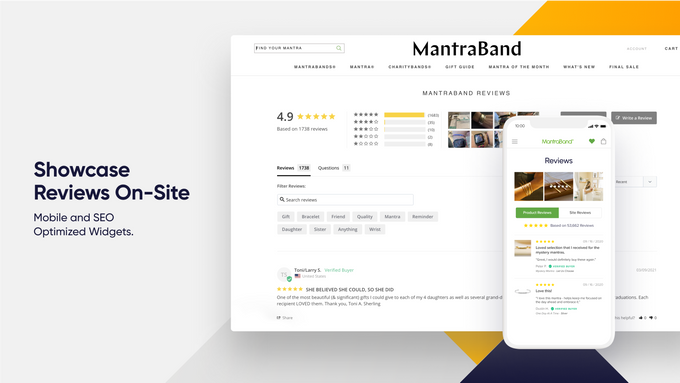
With over 4 million stores on Shopify alone, making sure your online store stands out is more important than ever. One way to do this is with a good product reviews app such as Stamped.io. Stamped.io is a highly-regarded customer marketing platform, featuring a whole heap of awesome integrated tools that help to both capture and showcase high-impact user-generated content (UGC).
The app provides a platform for customers to leave reviews with star ratings and text feedback for products on your store, collects and displays these reviews/ratings and supports rich snippets for search engines to display these review ratings in search results to help boost your stores reputation and credibility.
Sounds great, but is Stamped the right UGC app for you?
Let’s take a look.

Pros
- Will suit the needs of small, medium, or large sized e-commerce stores
- Competitive pricing that offers excellent bang for your buck
- Customer service and support is highly regarded
- Easy Google integration
Cons
- Some features are exclusive for Shopify only
- The interface can be slow to work with

Best for
Stamped.io is best for Shopify store owners who want to enhance the functionality of their product review section especially if they already have a high volume of customer reviews. It is an all-in-one e-commerce marketing solution which allows users to customize the appearance of their review section to match their store's branding, improve SEO with Google and social media platform integrations, and offers a range of site widgets, banners, templates and emails for maximum conversion potential. The app also offers flexibility with its pricing plans to match the goals and needs of stores of all sizes.
Overview of Features
Stamped.io allows users to collect customer product, photo and video reviews, making the showcasing of products and reviews on social media super easy. It also facilitates the addition of Q&A sections within your site which increases brand credibility through the sharing of real life customer experiences. Take this, in addition to the customizable on-site widgets, multilingual support, and mobile responsive themes, and you can quickly see that Stamped.io is certainly not lacking in the features department. Some more features of the app include:
- Review request emails: Automatically send review request emails to customers who have made a purchase on your store.
- Customizable emails: Customize review request emails that are sent to customers to match store branding, messaging, and design.
- Review generation: Allows customers to submit product reviews directly from your store or via email. You can also choose to manually add reviews from other sources such as Google, Facebook or Instagram.
- Review moderation: Users have control over which reviews are published on their stores, and can moderate them to ensure that they are genuine and appropriate, further enhancing brand credibility and preventing bots from spamming fake news.
- SEO-friendly reviews: Automatically generates SEO-friendly review content to help improve search engine ranking performance.
- Review widgets: Display product reviews using customizable review widgets.
- Review analytics: Detailed analytics on review performance, including metrics such as review submission rates, review approval rates, and more.
» Unlock your store's full potential by combining product reviews with the best e-mail marketing apps
Plans & Pricing
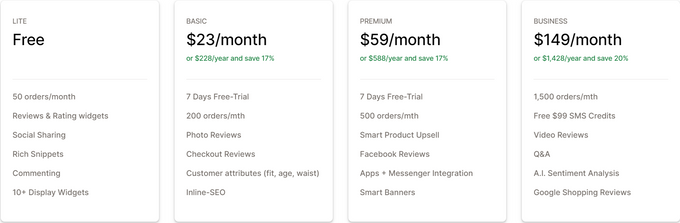
The pricing plans are charged on a monthly basis, and they are:
Integrations
Stamped.io integrates with a wide range of different e-commerce CMS platforms and other third-party apps, including, but not limited to:
Usability
Stamped.io's dashboard is generally very easy to use and you don’t have to be a computer genius to navigate the app’s interface. It is designed to work seamlessly with Shopify's existing product review system and offers customization options, such as the ability to choose where the review form appears on the product page, making it more user-friendly for customers to leave reviews. It is intuitive from both a merchant and customer perspective.
Support
Stamped.io's customer service is highly regarded amongst users. Their support team can be reached through either live chat or email, plus they have a very comprehensive help center with a ton of helpful content and a target response time of 24 hours. Additionally, the app provides a comprehensive documentation section that covers everything from installation to customization. This documentation section includes a step-by-step guide to help users set up the app on their store and troubleshoot common issues.
The Final Stamp of Approval?
If you’re on the market for a great all-in-one e-commerce marketing tool, then it's hard to look past Stamped.io. The app offers competitive prices, easy-to-use interface, and wide array of features which make it a solid option for Shopify store owners who wish to take their marketing efforts to the next level. It's especially useful for store owners with an established, medium to large sized customer base which can be utilized to its maximum potential. If you operate a smaller store with a smaller customer base then you may want to look at expanding your customer base first with a good sales app so you have more customers who can leave reviews on your store.
Stamped.io Review - Best Product Review App For 2026?

Recommended Reviews

Out-of-Stock Police: Best Inventory Management App for Shopify?
Sometimes, popular products fly off the virtual shelves of your Shopify store, leaving you with no inventory to serve new customers. When this happens, it’s important to ensure your customers aren’t actively trying to place orders for “out-of-stock” items. EGNITION's Out-of-Stock Police is a tool designed to assist store owners in optimizing and automating this process. The tool helps you to automatically push sold-out products to the bottom of your collections, so they’re less likely to get audience attention. Alternatively, you can hide your out-of-stock products completely until you refill your inventory. ProsFree package for up to 49 productsEasy-to-use interfaceCustomized sorting rulesAutomated workflows to save timeIncreased SEO performanceConsCan have a slight learning curveExpensive for the most advanced plans Out-of-Stock Police: Pricing Out-of-Stock Police offers a 7-day free trial to beginners, followed by a range of plans. There’s a free Bronze package, which supports stores with up to 49 products and 99 collections. This plan includes real-time automation, the option to hide or push your out-of-stock items down your collection lists, and tagging for out-of-stock products. You can also access 24/7 support and stock alerts. The paid plans essentially increase the number of products and collections you can manage, but they all include the same features. Options include: Customer Support Out-of-Stock Police promises 24/7 support to customers on every plan, including the free version. The company regularly releases new product updates and improvements, and guarantees fast responses if you’re having an issue with the app. However, the only real option for support is instant chat, so you won’t be able to call the team if you prefer to use the phone. Notably, the chat isn’t real-time, but someone is usually available to answer a question within the first hour or two after getting in touch. Who Is Out-of-Stock Police Best for? Virtually any business owner on Shopify could benefit from Out-of-Stock Police. All e-commerce leaders want to ensure their stores look up-to-date and engaging. That means it’s important to ensure your customers aren’t constantly facing “out-of-stock” notices whenever they click on a product page. Out-of-Stock Police helps to draw attention to the items you currently have available, so you’re more likely to generate conversions. It can also send you helpful automated alerts to let you know when you need to re-stock. Out-of-Stock Police: Features The focus of the Out-of-Stock Police app is to push your in-stock products into your customers' view, while moving out-of-stock items to the bottom of your collections. The tool integrates naturally with Shopify to help you organize your product portfolio. Key features include: Boosted SEO Out-of-Stock Police helps to boost your SEO by letting customers know when out-of-stock items will be returned to your site automatically. Rather than “hiding” pages, you can simply push them back in the collection queue, so they’re still indexed by Google. Automatic Collection Management The app will automatically push your out-of-stock items to the bottom of your collection as soon as your inventory status changes. This minimizes the amount of time you need to spend reworking your collections. Customization You can choose how you want to hide or move your out-of-stock items according to your inventory cycles. This could mean you set your product to be shown as “out of stock” for a certain number of days. If it doesn’t automatically come back in stock before the timer runs out, Out-of-Stock Police will continue to hide the product. Tagging You can assign specific tags to all out-of-stock items so you can use them in rules for smart collections, theme modifications, and other changes to your Shopify store. Automatic Republishing Business leaders can set the app to automatically re-publish hidden product pages when an item returns to “in-stock” status. This saves you the effort of manually removing and adding pages. Notifications You can get low-stock and out-of-stock alerts sent automatically to your email, complete with inventory data on a variant or product level. Easily export and download out-of-stock reports in seconds, so you can update your inventory. Out-of-Stock Police: Ease of Use Out-of-Stock Police is a relatively straightforward and convenient app. However, it might take a little time to get all of your automated workflows set up. You’ll need to define parameters like how long you want a page to be “pushed” to the bottom of your collection before the product is hidden. Despite this, the natural integration with Shopify and the convenient interface makes this tool a great choice for beginners. Plus, there’s plenty of customer support available if you have any issues. The Bottom Line: Is Out-of-Stock Police Worth It? Out-of-Stock Police is a convenient tool for companies struggling to keep track of their “out-of-stock” items on a Shopify store. It can help you to improve your SEO standing, increase your sales, and maintain the engagement of your target audience.
Nerdy Form Review: Free Form Builder for E-commerce Stores
Potential customers are more likely to fill out a contact form than call or email. Nerdy Form by Nerdy Apps allows you to add a customizable contact form widget to any of your store's pages. It is a spam-free contact form app that makes communication with customers more manageable to increase conversions. Nerdy Form is incredibly versatile; there are several types of form fields from which to pick, and you can easily alter the field set and field order of any form. Simple and ready to use, it takes one click to install the app on your store. Why You Should Use Nerdy Form This app ensures consistent message delivery and eliminates scenarios where customers are unable to contact a business owner, increasing your chances of making a sale. Google reCAPTCHA can be quickly applied to any form, helping deter spammers from exasperating merchants. A great feature of Nerdy Form is how it meets the demands of any shop without jeopardizing the user experience. Through conditional visibility and the multi-step feature, you can build and customize forms to integrate into the look and feel of your website. Key Features Flexible, adaptable form designAuto-reply emailFile uploadIntegration with Google reCAPTCHATerms and conditions checkboxRedirect after submissionPop-up formsCompatible with popular email marketing tools like Zapier, ActiveCampaign, Omnisend, and KlaviyoShow or hide a form field based on the user's selection using conditional logicPersonalize email templatesDate selector supporting various formatsThe option to include a store's location map on the contact pageForm donations and accept payments through StripeThe option to add a department and tailor email recipients based on that selectionMultiple email receivers Pricing Nerdy Form provides one free plan and four paid plans. Notably, if you choose to pay annually rather than monthly, the Bronze, Silver, and Gold plans cost $5, $9, and $24 per month, respectively. Additionally, the free plan includes all available features. Is Nerdy Form Worth It? To put it simply, yes! Nerdy Form is designed to prevent message loss, allowing potential customers to contact the store owner. Setting it up is simple, and you can modify the designs with just a few clicks to make them fit any store's aesthetic and integrate perfectly with the user interface (UI) of any website or device.
HelloBrand Review—Shoppable Video Links for Shopify Merchants
If you're looking for a new way to market your products, then you should consider the simple concept of shoppable videos. Users are far more likely to retain the information they see in a video than in a mess of text scrawled across your website—so why not throw in a purchasing link and let them buy directly from the video? Keep reading to learn all the different ways that HelloBrand's shoppable video service can help your store. What Does HelloBrand Offer Shopify Merchants? More Effective Social Media Marketing Have an Instagram business account but aren't seeing the conversion rate you'd like? Reuse your product videos from any social media platform and embed them on your store as shoppable video carousels or floating videos on your homepage or product pages. Each video comes with a link that you can share on all your socials, emails, and SMSes to redirect users straight to the shoppable video, increasing your conversions. UGC With More Impact Every e-commerce merchant is familiar with the benefit of user-generated content in the form of product reviews and ratings. Now, with HelloBrand, you can turn your UGC product review videos into shoppable ones to improve the effectiveness of your social proofing apps. Live Video Shopping If you haven't started hosting live videos to promote your brand and engage with your community, then now is the time to start. And with HelloBrand's technology, you can add purchasing links to your live videos when discussing products, allowing you to remove any doubt and answer customer questions in real-time before they purchase. On top of that, you can save and reuse live videos as conversion-boosting shoppable videos on your store. HelloBrand Pricing The cost of running HelloBrand on your e-commerce store works a little differently from most other Shopify apps. Instead of a few strict plans to choose from, the app is free to install and remains so up to 200 monthly views of your shoppable videos. After that, it's only $0.02/view for the rest of the month. Additionally, if you're worried about your company growth costing you more in the long run, you don't need to worry. HelloBrand offers you the control to set a flat rate that you're willing to spend each month, whereupon the service will simply pause for the rest of the month once that limit has been reached. This ensures that you have the chance to test the app and only have to pay for what you get. Our Verdict: Should You Use HelloBrand? E-commerce store owners are always looking for new ways to improve their marketing and increase conversions, and shoppable videos are a simple and effective way to do so. And with the free-to-use capabilities that only require a small, custom payment after a certain number of views and the excellent customer support available 24/7, there's really no good reason not to try it out for yourself! It's clear that, from the 5-star reviews on the Shopify app store, other e-commerce merchants feel the same. Head to their website to learn more or jump directly to their Shopify app store page to get started.