
ActiveCampaign Review (2026): Pricing, Integrations, Support and More!




Updated February 14, 2024
Our team tests eCommerce apps and publishes reviews that are unbiased and not influenced by payments we receive from some of the app developers.
E-commerce is a highly competitive industry, and more and more businesses are looking to automate their processes to keep up. As a result, the popularity of recent platforms such as ChatGPT and Bard has increased, bringing the revolutionary powers of AI to the forefront. If you run an e-commerce business and haven't yet thought about automating, then you should do so quickly or risk being left behind!
ActiveCampaign Email Marketing is a powerful marketing automation solution with over 180,000 active users. The app functions similarly to hiring staff that manages customer relationships, sales engagement, and marketing for your e-commerce store. It provides robust tools needed to automate your revenue-driving processes via sign-up forms, email automation (welcome messaging and abandoned cart), email campaigns, SMS messaging, and a whole bunch of other features, including a scalable CRM that makes it suitable for just about every type of e-commerce business.

What is ActiveCampaign Best For?
ActiveCampaign is targeted primarily at B2B businesses but with its scalable CRM, it is also suitable for B2C e-commerce stores as well. It is ideal for anyone involved in industries such as SaaS, technology, consultancy, real estate, insurance, and manufacturing. More specifically, it can help growing businesses with scaling, so if you already have an existing customer base, ActiveCampaign is a great app to use for decreasing costs and increasing efficiency.
Pros
- Tons of integration options
- Provides a body of knowledge to assist first-time users
- Many different pricing plans
- Scalable CRM
- Robust & proven software
Cons
- Can be pricey if you want all options
- Some users may find tricky to navigate
We feel it gets the balance just right between a CRM that is too big and clogged up with useless features, and a CRM that is too small and basic. With ActiveCampaign, e-commerce merchants will find a near-perfect solution for a hands-off approach to sales engagement, customer relations, and email marketing.
Features Overview
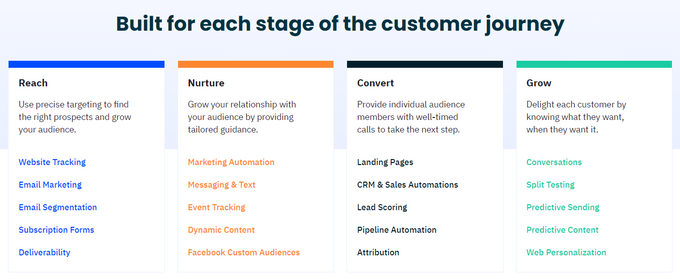
The app is loaded with features that help set it apart from competitors like Salesforce and Mailchimp. This includes but is not limited to automatically recommending new products to customers based on purchase history, sending reminders for abandoned carts, and offering personalized deals based on events such as birthdays.
Other useful features of the app include:
- 500+ Fresh Automation Recipes: Pick from hundreds of pre-built revenue-driving market automations such as welcome series and abandoned carts.
- Costless Account Support and Migration: ActiveCampaign helps you migrate your account from a previous software provider to the app seamlessly. The app also provides one-to-one support and strategy sessions to help grow your business.
- Drag-and-drop Landing Page Builder: You can create compelling landing pages that are tailored and relevant to your customer segments.
- Contact Management and Segmentation: Organize and segment your contact lists based on various criteria such as demographics, behaviors, interests, and interactions and send highly targeted and personalized messages to different segments of your audience.
- CRM and Sales Automation: Manage customer profiles, track interactions, and capture valuable customer data. Also provides lead scoring, contact and deal management, sales automation, and pipeline management features to streamline your sales processes.
- Website Tracking: Track visitor behavior on your website and trigger relevant automated campaigns based on their actions. You can also personalize your website content and messages based on individual contact data.
- SMS Marketing: Send personalized text messages to your subscribers. ActiveCampaign's SMS support can also be integrated into your automation workflows to reach customers through multiple channels.
ActiveCampaign Pricing & Plans
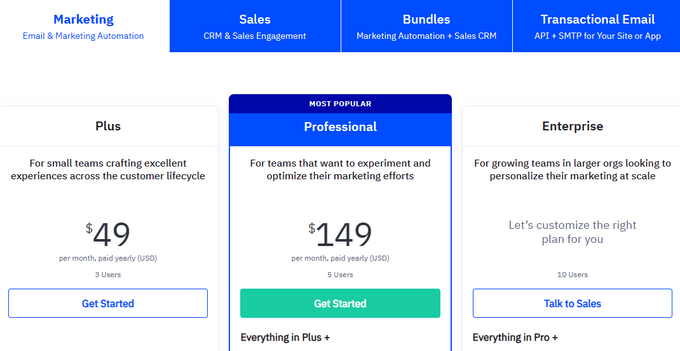
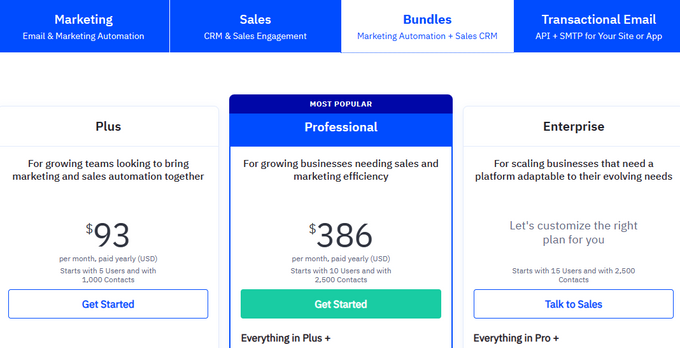
The app offers a 14-day free trial that gives access to 900+ pre-built integrations inclusive of Shopify as well as pre-built marketing automation recipes. The full range of pricing plans is available on ActiveCampaign's website but for Shopify specifically, there are two options: a marketing plan and a bundle plan.
Marketing
The marketing plan focuses on giving you email and marketing automation capabilities.
Bundles
The bundle option can give you marketing automation and sales CRM functionality.
ActiveCampaign Integrations
Integrations work seamlessly with many existing platforms to help businesses upgrade on their existing systems for better performance. In total, ActiveCampaign offers over 900 integrations and has over 900 pre-built automation tools for quick ROI.
Some of the more useful integrations can be broken down into:
- CRM: Integrations with popular CRM systems such as Salesforce, Pipedrive, HubSpot, and Zendesk.
- E-commerce: Leading e-commerce platforms such as Shopify, WooCommerce, Magento, and BigCommerce. Enables users to share data easily for hassle-free synchronization between platforms.
- CMS: Integrates with popular content management systems like WordPress, Drupal, and Joomla.
- Webinar Platforms: Including Zoom, GoToWebinar, and WebinarJam.
- Google Tools: Google Analytics and Google Tag Manager
- Lead Generation: ActiveCampaign integrates with OptinMonster, Leadpages, and Unbounce.
- Social Media: Direct integrations with the best social media platforms, including Facebook, Instagram, and Twitter.
ActiveCampaign Usability
ActiveCampaign is highly accessible to all users, even if their technical expertise is limited. Visually, it is appealing to look at, with a clean and organized dashboard that gives users a clear overview of their account and key metrics.
For functionality, it features an easy to use drag & drop email editor with pre-built content blocks and customizable templates that can be tailored to better fit your customers' preferences. Adding to this, the app also offers a flowchart-style automation builder, which we found simple and effective.
It is also easy to import and manage contacts for better audience segmentation and create comprehensive reports with easy-to-understand visualizations. Again we found that ActiveCampaign gets the balance right between pleasing visual design and useful, functional information.
» Make your online store stand out with the best store design apps for Shopify
ActiveCampaign Support
There are a number of different support options that come with the app, including an online database, video tutorials, community forums, and email/chat support.
The online database can be found on ActiveCampaign's website and contains sources such as articles, guides, tutorials, and frequently asked questions (FAQs) covering various topics related to using the platform. Users can also find video tutorials that provide step-by-step instructions on how to use different features and functionalities of the platform. A demo can also be requested.
The site also features a community forum where users can interact with each other by asking questions, discussing topics, and sharing experiences related to using the App. For a more direct line, ActiveCampaign also offers customer support through email and chat.
Take Your Campaign To The Next Level
If you're reading this article, chances are you're involved in e-commerce business and if you're involved with e-commerce business, then you should know all about the importance of automating processes and workflows for maximized efficiency.
ActiveCampaign offers a great marketing automation solution with a quick and easy setup and proven results. For e-commerce startups, it may not be ideal as the costs might be a bit high without an established customer base, but for any small to medium-sized business looking to expand and scale their operation through automation, ActiveCampaign really is one of the best apps out on the market.
ActiveCampaign Review (2026): Pricing, Integrations, Support and More!

Recommended Reviews

Zendrop Review (2026) - Automated Dropshipping For Shopify Merchants
Dropshipping has become an increasingly popular business model for online store owners, allowing them to sell products without the hassle of having to keep physical inventory or handle shipping themselves. To make it work effectively, however, it's essential to have a good dropshipping app. A good dropshipping app helps simplify operations, streamline processes, and assists with providing a better customer experience. In this post, we'll take a closer look at Zendrop, one of the best dropshipping apps on the market and available to install for free on Shopify. What Is Zendrop? Zendrop is an e-commerce app that seeks to break language barriers that exist with suppliers from platforms like AliExpress, which can cause issues such as misbranded packaging, incorrect order fulfillment and slow delivery times. It has an intuitive interface which allows businesses to easily create and customize their own online storefronts and import products directly from the platform to their own e-commerce website. Zendrop was specifically designed for dropshippers by dropshipping experts themselves, connecting online merchants and suppliers together with ease. Using this firsthand experience, their dedicated team understand the challenges and requirements of their users and strive to provide the necessary tools and resources to ensure business success. With a 4.8 star Shopify rating and 6000+ Shopify reviews, Zendrop is a great option for anyone looking to begin their dropshipping journey. What Is Zendrop Best for? ProsNo struggle with language barriersVetted suppliersUser-friendly interfaceWide range of products and suppliersAutomated order fulfillmentCompetitive pricingConsThe free plan doesn't offer live chatLimited customization options This app is best for online merchants and dropshipping Shopify store owners who are seeking reliable suppliers and a seamless experience with purchasing products for their stores, custom branding, and improved delivery speed. In addition to its product sourcing and management capabilities, Zendrop offers a range of features to help businesses streamline their operations, including automated order fulfillment, real-time inventory tracking, and customizable shipping options. It also offers a suite of analytics and reporting tools to help businesses track and optimize their performance over time. Zendrop Pricing Zendrop offers a variety of pricing plans to cater to different business needs and sizes. Whether you are just starting out or scaling up your business, Zendrop's pricing options provide flexibility and value. Let's take a closer look at the different pricing plans and what they offer. Zendrop offers three price packages: Free Plan: The free plan features 50 orders monthly, bulk ordering, 24/7 email support, and shipment tracking.Pro Plan: The plan costs $49 per month or $41.58 per month, billed at $499 annually. This plan features express shipping, auto-fill orders, bulk orders, unlimited orders, live chat, bundles and subscription boxes, and instant product sourcing.Plus Plan: The plan costs $79 per month or $549 billed annually. This plan features everything from the Pro Plan and more. Zendrop Integrations Zendrop integrates with various platforms and tools to streamline your dropshipping business. The platform integrates seamlessly with popular eCommerce platforms such as Shopify, WooCommerce, and BigCommerce, making it easy for you to import products, manage orders, and track shipments. Additionally, Zendrop integrates with various third-party tools like Facebook Ads, Google Ads, and Klaviyo to help you optimize your marketing campaigns and streamline your operations. With these integrations, you can easily automate your dropshipping business and focus on growing your brand. Zendrop Features Zendrop features the following: Automated Dropshipping Turn on Auto-Fulfillment to put your order fulfillment on autopilot.24/7 Support Zendrop offers 24/7 support for all users and even customer support for users on Zendrop select.United States Fulfillment Zendrop ships from the US warehouses and trusted US suppliers within 5 to 8 days to end customers.Custom Branding You can set yourself apart from the competition by customizing your products with unique labeling and custom packaging.World-Class Support Work with Zendrop's world-class support team around the clock in order to keep a pulse on all of your business needs at all times.Endless Product Catalog Zendrop offers over 1,000,000 products to sell, and if you can't find what you need, they'll source it for you.Scaling Resources Zendrop is equipped with resources and a world-class support team, ready to help you scale your business. Thank You Cards Send thank you cards in every order. Subscription Boxes Create subscription boxes for recurring revenue in a few easy steps.Analytics Keep track of your business processes in a single dashboard. Zendrop Usability Zendrop offers a user-friendly platform that simplifies the dropshipping process. It provides a streamlined system for product sourcing, order management, and fulfillment, which makes it easy for users to navigate and manage their business operations. The platform is designed to be intuitive, so users can quickly learn how to use it without any extensive training or technical knowledge. This app is very easy to use and integrate, and the 24/7 support helps make the process a lot simpler. » Discover the differences between the top dropshipping apps by reading one of the best EPROLO vs. Zendrop reviews Zendrop Support Zendrop offers 24/7 support via live chat and email, a FAQ page, and a Slack channel dedicated to both your and Zendrop's teams whenever you require help. Zendrop offers customer support through live chat, email, and a support center with articles and tutorials. They also have a Facebook group for users to connect and share tips and advice. Their support team is known for being responsive and helpful, and they offer assistance with issues such as order fulfillment, shipping, and product sourcing. Become a World-Class Dropshipper Zendrop is a great option for anyone looking to dropship without the hassle of dealing with language barriers, order fulfillment, and finding the right suppliers. The app allows you to focus on growing your business and improving customer satisfaction. Overall, if you're looking for a hassle-free way to start dropshipping, Zendrop is a reliable and effective solution.
Smile.io Review (2026): Pricing, Integrations, Support & More
E-commerce is a competitive market and an effective tactic to increase your average order value and overall sales is loyalty and rewards programs. These offer different benefits to your customers and incentivize them to stay loyal to your brand. Consider that 71% of customers consider their membership to a loyalty program as integral to their relationship with a brand, meaning your customer retention can jump by 5% and overall sales can increase by 25%. There is a wide array of apps available to make managing loyalty and rewards programs convenient. Smile.io is a highly-rated Shopify app that aims to help you make first-time customers forever customers by letting you build your own loyalty and rewards programs. Let's take a closer look. ProsHighly customizedProvides detailed analyticsUser-friendlyOffers multiple reward optionsConsCan be complex for beginnersLimitations on free planRequires ongoing maintenance and updates What Is Smile.io? Smile.io is a customer loyalty platform that helps businesses create and manage loyalty and rewards programs effectively for their customers. Businesses can customize rewards and points to encourage repeat purchases, set VIP tiers for exclusive benefits, and introduce referral programs. Best For Smile.io works best for small to mid-sized businesses, especially if you use Shopify as your e-commerce platform. The app is easy to use and requires no coding skills—you can do everything from the dashboard, saving smaller businesses developer costs. Smile.io's functionalities are also fully customizable, so it's easier for small and mid-sized businesses to establish their brand identities. Overview of Features Loyalty Points Program You can offer your customers loyalty points for various actions, such as joining the program in the first place, making a purchase, referring a friend, or engaging with your business on social media. Your customers can then redeem these points for rewards that include discounts, free products, or free shipping. An additional feature we really like is the Smile Wallet. Instead of endlessly searching through their emails, your customers can view their available points in the wallet. It also updates automatically, so you and your customers don't have to keep track of points earned and spent manually. Referral Program The referral program can help you incentive your customers to recommend your program to their friends and family. We like that this feature has a triple pay-off: your customer, their successful referral, and your business are rewarded. Just like the loyalty program, your customers can use their points to get rewards like discounts, free products, or free shipping. Additionally, because Smile.io can integrate with different email programs, you can easily keep your new and current customers up to date. VIP Program Make your customers feel like stars with Smile.io's VIP program by offering exclusive rewards and benefits. You can create tiers within the program and encourage your customers to keep on climbing the ranks with automatic rewards each time they reach a new tier, including free products, discounts, or the option to earn points faster. As an added push, you can set milestones for your customers, including time limits, to create a sense of urgency and inspire action. Plans & Pricing Smile.io offers four different plans to Shopify sellers so you can choose which one will suit your needs and budget best, including a free plan. The free plan offers basic functionalities, including basic branding options and a limit of 200 monthly orders. The Starter Plan already gives you access to advanced branding and unlimited orders, but still restricts you to one integration. The Growth Plan introduces pop-up and point expiration features, but access to features like the VIP program and unlimited integrations only comes with the Pro Plan. Integrations Smile.io offers integrations over a wide range of platforms to give your business a stable position such as: Email & SMS marketing: Klaviyo, Mailchimp, HubSpot, SMS Bump.Customer reviews: Reviews.io, Judge.me, Stamped.Customer service: Gorgias.Forms: Privy.Business intelligence: Glew.io. Usability Smile.io has a user-friendly interface that allows you to easily manage your loyalty programs and track customer engagement. Along with a fast setup time, the app also offers customization options that help you tailor your programs according to your specific needs. And because Smile.io offers seamless integrations with popular e-commerce platforms like Shopify, Mailchimp, and Klaviyo, it makes it easy to incorporate your programs into existing marketing and sales strategies. Support Smile.io's robust support system has a 24/7 available support team. You can also refer to other resources, including e-books, industry guides, and research papers. Additionally, Smile.io regularly publishes and updates blogs and holds Q&A sessions to discuss new trends and new platform functionalities. Plus, a demo video is always available to help beginners. These resources mean you feel confident and that Smile.io has your back. Give Your Customers a Reason to Smile In a nutshell, Smile.io simplifies the process of creating and managing a loyalty program by offering features such as point programs, referral programs, and VIP programs, all in one platform. The key benefits you can get from loyalty and rewards program include improved customer engagement, higher average order value, and increased customer lifetime value. Due to its user-friendly dashboard and helpful resources, it is no wonder more than 100,000 businesses rely on Smile.io to keep their customers happy and engaged with a comprehensive loyalty program solution.
Nerdy Form Review: Free Form Builder for E-commerce Stores
Potential customers are more likely to fill out a contact form than call or email. Nerdy Form by Nerdy Apps allows you to add a customizable contact form widget to any of your store's pages. It is a spam-free contact form app that makes communication with customers more manageable to increase conversions. Nerdy Form is incredibly versatile; there are several types of form fields from which to pick, and you can easily alter the field set and field order of any form. Simple and ready to use, it takes one click to install the app on your store. Why You Should Use Nerdy Form This app ensures consistent message delivery and eliminates scenarios where customers are unable to contact a business owner, increasing your chances of making a sale. Google reCAPTCHA can be quickly applied to any form, helping deter spammers from exasperating merchants. A great feature of Nerdy Form is how it meets the demands of any shop without jeopardizing the user experience. Through conditional visibility and the multi-step feature, you can build and customize forms to integrate into the look and feel of your website. Key Features Flexible, adaptable form designAuto-reply emailFile uploadIntegration with Google reCAPTCHATerms and conditions checkboxRedirect after submissionPop-up formsCompatible with popular email marketing tools like Zapier, ActiveCampaign, Omnisend, and KlaviyoShow or hide a form field based on the user's selection using conditional logicPersonalize email templatesDate selector supporting various formatsThe option to include a store's location map on the contact pageForm donations and accept payments through StripeThe option to add a department and tailor email recipients based on that selectionMultiple email receivers Pricing Nerdy Form provides one free plan and four paid plans. Notably, if you choose to pay annually rather than monthly, the Bronze, Silver, and Gold plans cost $5, $9, and $24 per month, respectively. Additionally, the free plan includes all available features. Is Nerdy Form Worth It? To put it simply, yes! Nerdy Form is designed to prevent message loss, allowing potential customers to contact the store owner. Setting it up is simple, and you can modify the designs with just a few clicks to make them fit any store's aesthetic and integrate perfectly with the user interface (UI) of any website or device.