
Omnisend Reviews (2026)—Pricing, Features, Support, and More






Updated February 14, 2024
Our team tests eCommerce apps and publishes reviews that are unbiased and not influenced by payments we receive from some of the app developers.
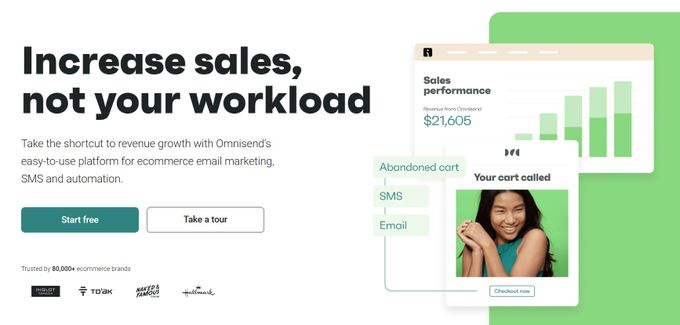
Omnisend is an all-inclusive email marketing automation app created for e-commerce brands focused on growth and sales. It can help Shopify store owners convert prospects into customers, design personalized emails in minutes, and introduce automation to your email marketing. Omnisend also allows you to use smart segmentation to craft relevant and hyper-targeted email messages to boost your revenue.
With Omnisend, you can create personalized, targeted email and SMS campaigns, automate your marketing workflows, and engage with your customers on a deeper level. Its user-friendly interface, advanced segmentation options, and easy-to-use automation features make it an ideal solution for e-commerce merchants looking to take their marketing efforts to the next level.
What Is Omnisend?
Omnisend is a marketing automation platform designed for all e-commerce platforms including Shopify, Woocommerce and Bigcommerce. It offers advanced features to create customizable email and SMS campaigns, automate marketing workflows, and increase customer engagement levels.
With its user-friendly interface, advanced segmentation options, and easy-to-use automation features, Omnisend helps e-commerce merchants to streamline their marketing efforts and boost sales.

What Is the Best Use for Omnisend?
Omnisend is best for for e-commerce stores that have outgrown their traditional email marketing platforms and are looking to take the next step in driving sales and growth even further. It has the latest email marketing automation tools and offers a range of advanced features to create personalized, targeted email and SMS campaigns, automate marketing workflows, and connect with customers on a deeper level.
With its user-friendly interface, advanced segmentation options, and easy-to-use automation features, Omnisend helps e-commerce merchants to create effective marketing strategies that generate results. Additionally, with 24/7 customer support and a range of pricing options, Omnisend is accessible to businesses of all sizes.
Pros
- Seamless integration with all e-commerce platforms
- Email and SMS marketing functionality
- Various automated workflows
- Intuitive and simple interface
- Free plan users have unlimited contacts
- Stellar customer service
Cons
- Limited flexibility regarding customization
- Not multi-lingual (English only)
- Doesn't save data for social media campaigns
Omnisend Subscription Plans
Omnisend offers a range of pricing options designed to suit the needs and budgets of businesses of all sizes. Its pricing plans are based on the number of subscribers you have, with a free plan available for up to 500 subscribers.
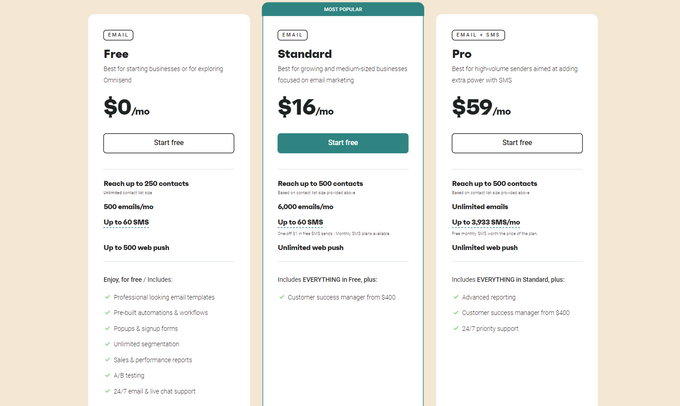
Omnisend offers pricing in 3 tiers: Free, Standard, and Pro.
- Free Plan: While you're limited to 500 emails and 250 contacts per month, the free plan still offers a range of advanced features, including email templates, popups, signup forms, and pre-built workflows.
- Standard Plan: The standard plan works in tiers:
- $16: 0 to 500 subscribers and 15,000 emails monthly.
- $20: 501 to 1,000 subscribers and 15,000 emails monthly.
- $25: 1,001 to 1,500 subscribers and 18,000 emails monthly.
- $30: 1,501 to 2,000 subscribers and 25,000 emails monthly.
- $36: 2,001 to 2,500 subscribers and 30,000 emails monthly.
- Pro Plan: The pro plan starts at $59 monthly, depending on your subscriber list.
Omnisend Integrations
Omnisend offers a range of integrations with other popular apps, allowing merchants to create a seamless customer experience. Omnisend integrates with 35% of the most popular apps and platforms globally. Here are some of them:
- Zapier
- Shopify
- BigCommerce
- WooCommerce
- WordPress
- Okendo
- Gorgias
- Justuno
- Intercom
- ShipStation
- Attentive
- Shopify Plus
- Easyship
- Elink.io
- Privy
- Stamped
- LoyaltyLion
Omnisend Features
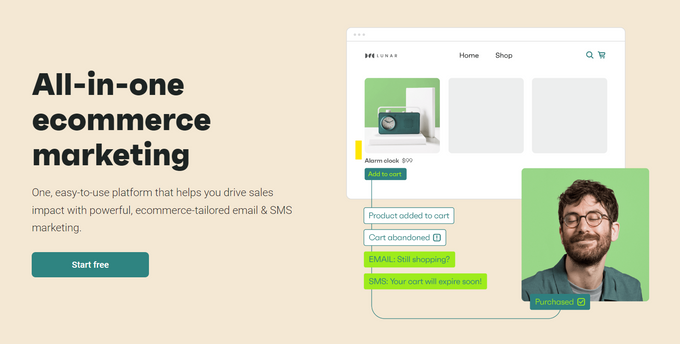
Omnisend offers a range of advanced features designed to help e-commerce merchants streamline their marketing efforts and drive sales. Forms, email and SMS campaigns, automation, a content editor, and reports, including sales reports, automation reports, campaign reports, audience segmentation, and targeting, are all offered by Omnisend.
» Best Shopify apps for reporting here
Additionally, it keeps customers up to date through Facebook Messenger and assists users in communicating with subscribers through WhatsApp.
Some of its key features include:
- Third-party Integrations
- Auto-responders
- ROI tracking/Analytics
- AB Testing
- 2-way messaging
- Contact management
- Drip Campaigns
- Customizable CTAs
- CAN SPAM Compliance
- Dynamic content
- Mass Texting
- Lists management
- Image Library
- Event-Triggered Actions
- WebForms/Landing Pages
- Message Personalization
Usability of Omnisend
Omnisend is very effective and easy to use for setting up automated triggered emails for customer retargeting/activation, follow-up, reviews, etc. Omnisend's user-friendly interface makes it easy for e-commerce merchants to create and manage email campaigns, SMS messages, and other marketing automation workflows for any type of business.
Its drag-and-drop email editor and pre-built templates make it simple to create professional-looking emails without any design experience. Plus, its automation workflows allow merchants to set up triggered messages based on customer behavior, such as abandoned cart reminders and order confirmations.
Omnisend Support
Omnisend offers a range of support options for its users. Its support team is available 24/7 via email and live chat to help users with any questions or issues that may arise. In addition, Omnisend offers a detailed knowledge base and resources such as guides, webinars, and case studies to help users get the most out of the platform. Omnisend offers the following support:
- Live chat
- Knowledge base
- Help desk/email
- 24/7 live rep
- YouTube channel (workshops and tutorials)
Make Marketing Relevant With Omnisend
Omnisend is an excellent app for e-commerce marketers and brands seeking to grow their businesses via seamless and effective email marketing. The app is easy to use and provides a hands-off approach. You can effortlessly integrate the solution into your current business processes as well, as it integrates with 35% of the most popular apps and platforms globally and in e-commerce.
Omnisend Reviews (2026)—Pricing, Features, Support, and More

Recommended Reviews

PageFly Review 2026: Pros & Cons, Pricing, & More
In today's competitive e-commerce market, having a visually appealing and easy-to-navigate website is essential for your business' success. A well-crafted website that's easy to navigate can help attract more customers, increase your brand visibility, and build credibility while providing an enjoyable user experience. If you're looking for an easy way to make your Shopify store look more attractive, PageFly is an advanced e-commerce page builder that allows you to design and customize your store in a matter of minutes. Below, we'll look into the app's pros, cons, pricing, and more to help you decide whether this is the best Shopify store design app for you. Pros150,000+ active usersAdvanced analytics toolsUnlimited design options24/7 supportOptimized for mobile phonesConsLimited Free VersionPossible slow loading at times Best For Offering great features for conversion rate optimization, PageFly is best suited for e-commerce merchants, partners, agencies, and freelancers. If your aim is to build advanced web pages without the help of a technical programmer, PageFly can come in quite handy. Although the app is useful for most e-commerce stores, it's particularly beneficial for SMBs using Shopify. In addition to offering customizable templates for your Shopify page, the app also comes with the latest Shopify features, including Countdown Timers, Opt-in Forms, and Image Carousels, making it a great choice for Shopify store owners. » Check out other apps to increase sales as well Overview of Features PageFly offers a host of helpful features for building your landing pages, including the following: Customizable Page Templates The app provides a library of over 100 templates you can use as the foundation of your page. The available template types include: Holiday pageLanding pageHome pageCollection pageProduct pageIntegration templatesAbout pageContact pageBlog post pagePassword page What's more, all the templates are highly customizable—you can change them to your liking and add elements such as custom images, video backgrounds, product carousels, and more. This can help make your pages match your brand identity, increasing your chances of sales by reinforcing your brand with your customers. » Here's what you need to build your Shopify store's landing pages Drag-and-Drop Page Builder The drag-and-drop page builder makes it easy for you to create and customize your pages with just a few clicks. In addition to the easy-to-use options for adding images and slideshows, text editing, and button design, you can also add HTML and CSS code if you wish. The builder lets you simply drag the elements you want into place, adjust their settings, and save changes to facilitate your store design and improve customer experience in your store in no time. Mobile-Responsive Pages PageFly helps make sure that your pages look great on any screen by automatically optimizing them for mobile devices. This helps ensure your store's design looks great even when customers access your store from tablets or phones, improving user experience and boosting your chances of conversion. SEO-Friendly Pages You can expect the pages you create with PageFly to be optimized for search engine crawlers and users. With helpful SEO elements like meta tags and descriptions, PageFly's pages are designed to rank higher in search engines, driving more organic traffic to your store. This can increase your store's visibility, improving its performance and helping you attract more customers. Analytics & Tracking PageFly also allows you to track page views as well as conduct A/B tests to test different page variations. Some of the useful analytics PageFly provides for your pages include: Page visitsTime on pageConversion rate This data can help you understand user behavior in your store and make decisions based on their actions. By tracking and measuring the performance of your pages, you can make improvements to boost your store's bottom line. Plans & Pricing PageFly offers several plans depending on the features that you need. Here's what they are: Free Plan: Best for those who are just starting out, the Free Plan includes PageFly's basic features with 1 slot to test out the page builder before committing to a paid plan.Pay As You Go Plan: Offering additional flexibility and payment on a per-user basis, this plan comes at $24 per month for 10 slots, all app features, and 24/7 live chat support.Enterprise Plan: Best for those who need advanced customization features, this plan includes access to all of PageFly's features, priority support, SEO optimization, the ability to create unlimited pages, and more for $199 per month. Integrations PageFly also offers a wide variety of integrations with other popular apps and services to streamline your marketing efforts and enhance your performance. This allows you to easily add features such as customer reviews, product upsells, Google Analytics tracking, and more. Additionally, you can use PageFly to add custom code and tracking snippets so you can easily choose third-party integrations or custom scripts. Popular integrations available with PageFly include: KlaviyoJudge.meYotpoMailChimp These top-tier integrations offer an array of features to improve the user experience and take your online store to the next level. Usability As it requires no coding knowledge, PageFly is very easy to use—all of the features are intuitive and simple to navigate with just a few clicks. PageFly's intuitive user interface makes creating beautiful, mobile-responsive pages easy with minimal effort. Its drag-and-drop builder significantly facilitates page customization, while the various integrations with other popular apps and services like Klaviyo or Judge.me further streamline the page-building process. Support PageFly offers 24/7 customer support in the form of either live chat or email. The app's knowledgeable team will help you with any queries you have about the platform in a timely manner, helping you resolve any issues quickly. This is what we love about PageFly the most, as it helps build trust and reassure merchants that resolving their issues is a priority. What's more, the app offers additional resources like the Help Center, video tutorials, blog posts, and an active Facebook group for users of the platform, which is a great place to get advice from other merchants. Build a Profitable Store One Page at a Time PageFly is a feature-rich page builder for Shopify stores that offers a powerful suite of tools to help you create and customize pages quickly, easily, and efficiently. With its user-friendly interface, reasonable pricing, and strong customer support, we highly recommend PageFly. This page-building app is a great solution to boost user experience and sales in your Shopify store that benefits newbies and experienced users alike.
GoAffPro Review - Pricing, Features, Integrations, and More!
Influencer marketing is all the rage right now, and GoAffPro can help you capitalize on the trend. By simply paying one or more affiliates for each visitor or client, you can now effortlessly employ performance-based marketing and create income. For your store, GoAffPro is a complete affiliate and influencer marketing solution that can help you develop a custom branded affiliate site in minutes. Customers are paid monetarily for posting product information on social media, and the featured app has the potential to transform your customers into marketers. What Is GoAffPro? GoAffPro provides businesses with a suite of tools to help them manage and optimize their affiliate marketing programs. The platform includes a range of features such as affiliate portals, analytics, multi-level marketing, and customization options, all designed to help businesses maximize their affiliate marketing ROI. With GoAffPro, businesses can easily track and manage their affiliates, view real-time analytics, create customized campaigns, and more. The software is user-friendly, scalable, and customizable to suit the needs of businesses of all sizes, making it a popular choice among marketers and businesses looking to grow their affiliate marketing programs. Pricing GoAffPro offers 4 pricing plans: Free Plan The Free Plan offers unlimited affiliates, unlimited revenue, a branded affiliate portal, welcome emails, analytics, post-checkout popups, and mobile apps. Premium Plan $24 per month The Premium Plan includes all the features of the Free Plan, plus multi-level marketing, an affiliate portal on your own domain, bulk email, advanced analytics, and 30+ customization options. Business Plan Starts at $89/month plus 0.9% of net affiliate sale volume The Business package provides tailored solutions for merchants to optimize their affiliate marketing program with a comprehensive set of features and tools. Enterprise Plan Starts at $199/month plus 0.9% of net affiliate sale volume The Enterprise plan offers customized solutions with custom features, a dedicated account manager, and always-on-call support. Integrations PayPalReCharge PaymentsMailchimpKlaviyoOmnisend Highlight Features Per product and per affiliate commission Setup default commission for the entire site and/or different commissions for different products and affiliates. You can also exclude products from the affiliate program. Mobile-ready with Android and iOS apps GoAffPro is optimized for mobile, allowing you to track affiliate conversions on both mobile and desktop. Multiple tracking methods Track affiliate orders through referral links and coupon codes. Real-time tracking Receive updates and get notifications of affiliate orders in real time. Automatic coupon codes Track affiliate orders through automatically created and unique coupon codes. Link sharing Affiliates can share their links and coupons on social media, in emails, and on web pages. Payments Pay your affiliates via PayPal Payouts (from within the app itself) or any custom payment mode. Multi-level marketing Create a multi-level affiliate network with up to 10 levels of affiliates and a commission for every level. Multilingual GoAffPro is available in 10 languages, including French, Spanish, German, Italian, Swedish, Portuguese, and Russian. Usability and Support GoAffPro is a 2.0 theme that doesn't require any coding to set up. The app comes with intelligent defaults and one click is all it takes to launch your customized affiliate program. With this app, you'll get prompt responses from support. Additional tools such as FAQs and a transparent developer website make the user experience even better. The Bottom Line: Should You Use GoAffPro? Affiliate marketing can help you acquire more customers who might otherwise be unaware of your products. GoAffPro can increase your shop's exposure and popularity with each shared link, and the feedback loop function allows your customers to share your products with their friends and family, boosting the chances of your product going viral. GoAffPro gives you complete control over your influencer marketing strategy. The value of a multi-level network, for example, is obvious for both merchants and affiliates. The program offers businesses a low-cost marketing alternative and guarantees they will only be charged when affiliates refer purchases to their store.
ReferralCandy Review (2026): Pricing, Support, Features, & More!
Customer referrals are one of the most powerful forms of marketing in e-commerce. A successful customer referral program can increase your brand awareness, convert new customers, and increase customer loyalty and retention. However, implementing a customer referral program is not always easy. Not only must you find ways to recruit customers, but you need to continually track their progress, monitor for fraudulent referrals, reward successful referrals, and measure your campaign's effectiveness. This is where ReferralCandy comes in. It's a tool that helps you create, run, and optimize referral programs for your online store. We take an inside look at the app's features, pricing, integrations, support, and more to help you decide if ReferralCandy is worth investing in. » If sales is a top priority, check out our picks of the best sales-boosting apps Best For Choosing the right apps for your store can be challenging, so we're here to help. ReferralCandy is a valuable tool for e-commerce stores selling single-use or subscription products in any industry. However, it's not a magic bullet that will instantly raise your bottom line. It's better suited to stores with an established product-market fit, generating more than 100 orders a month. The app also proves most beneficial to businesses with loyal customers who champion their brand, creating opportunities for further community building. ProsCustomizable referral pages, emails, & rewards24/7 live chat supportIntegrations with popular e-commerce toolsExtensive automationsConsNo free planPricing includes monthly & referral fees Overview of Features Customer Enrollment Enrolling customers into your referral program is made easy with a variety of channels available, such as post-purchase pop-ups, emails, dedicated landing pages, an embedded signup form, or using your existing newsletters. You can also send automated referral requests to customers after they complete a checkout. A great bonus is that all your emails and pages are optimized for mobile devices, so customers can easily share your products or services with their friends. Customizable Templates ReferralCandy is an excellent app with built-in templates. You can use these ready-made templates as is or customize them to suit your needs. You can change the logo, images, fonts, colors, and other elements to match your store's branding. If you want more control over your templates, you can edit the CSS and HTML code to fine-tune every detail. Automated Rewards With ReferralCandy, creating and managing a reward system for customers who refer your products to friends is quick and simple. You can offer cash rewards, coupons (cash or percentage discounts), or custom gifts. The issuing of rewards is fully automated, so you don't have to worry about tracking referrals or sending rewards manually. You can also set up different reward tiers to incentivize more referrals. Fraud Detection With the fraud center at your fingertips, you can automatically protect your referral program from fraud. It detects and bans suspicious transactions, such as self-referrals, high volumes of referrals in a short time, or leaked referral codes on coupon sites. You can also create custom rules to block or flag specific behaviors or users. Analytics You can measure the performance of your referral program with ReferralCandy, as it functions as a comprehensive analytics app. You'll be able to see how much sales and traffic you generate from referrals, how many customers participate in your program, and what kind of rewards they prefer. Plus, you can compare your results with industry benchmarks and get data reports to optimize your strategy. » Accurately measure your income with ReferralCandy & one of these great sales-tracking apps Plans & Pricing If you're wondering what to spend on apps to grow your business, you'll be happy to know that ReferralCandy offers three paid plans, each with a 30-day free trial and a 20% discount on annual subscriptions. Here's a quick overview of the features and prices of each plan: Premium The Premium plan is ideal for smaller businesses and startups. With a monthly fee of $59, or just $47 when billed yearly, you get unlimited customers and referrals, a comprehensive analytics dashboard, and data reports, among other features. However, you'll also need to pay a 3.5% commission fee on the referral sales you generate. Plus Accelerating your team's growth through referral marketing is made easy with the Plus plan—a package designed precisely for this purpose. For $299 per month, you get everything in the Premium plan, plus prioritized support, a dedicated account manager, and a quarterly campaign review with recommendations. You also pay a lower commission fee of 1.5%. Enterprise The Enterprise plan is the plan of choice for bigger e-commerce stores, as it offers advanced features for larger and more complex referral programs. You get everything in the Plus plan, plus unlimited campaigns, custom integrations and analytics, and a one-on-one expert review of your campaigns. What's more, there are no commission fees on referral sales made! Pricing will depend on your specific needs, so you'll need to contact ReferralCandy for a cost estimate. Integrations The app integrates seamlessly with various platforms and tools to expand your e-commerce business. ReferralCandy's integrations can be divided into the following categories: Platform Integrations The app integrates with several leading e-commerce platforms, including: ShopifyShopify PlusMagentoWooCommerceBigCommerce You can easily set up and manage your referral program from within your platform's dashboard without having to switch between different apps. Subscription Integrations These integrations will enable you to create a referral program for your subscription-based products or services. Some of the subscription integrations supported are: Recharge SubscriptionsBold SubscriptionsAppstle Subscriptions Marketing Analytics Integrations To help you make data-driven decisions, ReferralCandy integrates with the following: Facebook PixelAdRollGoogle Ads Email Marketing Integrations Integrations with top email marketing apps are essential to send personalized and automated emails to your subscribers. This way, you can create tailored messaging that speaks directly to the individualized interests and desires of each customer demographic. Some of the apps supported are: KlaviyoMailChimp Usability ReferralCandy is an out-of-the-box solution that doesn't require the help of a developer. You can set up your referral program and make your first sales within 30 minutes. The video below shows just how easy it is to get started with ReferralCandy on Shopify. It has a simple and intuitive user interface that makes it easy for merchants to use. The app also automates a lot of tasks for you, such as sending emails and pop-ups, issuing rewards, detecting fraud, and providing analytics. You can monitor and control your program from your dashboard, where you can see all the important information and data. Overall, ReferralCandy is designed with the user in mind, and even people brand new to referral marketing won't have a problem navigating the app. Support ReferralCandy offers a variety of support options to help you get started and troubleshoot any issues you may encounter. There is 24/7 live chat support, and for Plus and Enterprise plans, there is a dedicated account manager. They host regular live Q&A sessions and webinars to help you learn more about what the app has to offer and how best to use it. Video tutorials and a dedicated YouTube channel cover everything from getting started to using the app's advanced features. In addition, ReferralCandy has a support center with over 100 articles on a wide range of topics like account management and configuring settings. They also offer several handbooks, e-books, blog posts, and case studies, so there is no shortage of referral marketing advice and inspiration. Customer Referrals: Sweeten the Deal With ReferralCandy Referral marketing is a cost-effective and impactful marketing approach that can benefit any e-commerce store. Customer referrals build brand awareness and increase customer acquisition while also boosting conversions, improving customer loyalty, and increasing customer lifetime value. But running successful customer referral campaigns can be complicated, tedious, and time-consuming. ReferralCandy is an essential Shopify tool that can help you create, manage, and optimize your referral program with ease. It offers a range of features and integrations that make it stand out from other apps, like easy setup and customization, automated rewards and fraud detection, comprehensive analytics and insights, flexible pricing, and outstanding customer support and service. So if you're ready to offer customers a deal they can't refuse, try out ReferralCandy. » Diversify & amplify your marketing strategy with some of the best marketing apps for Shopify