
Entail AI Review (2026): Pros & Cons, Features, and More






Updated November 16, 2023
Our team tests eCommerce apps and publishes reviews that are unbiased and not influenced by payments we receive from some of the app developers.
Content marketing is a great way to reach and engage your target audience, but doing it well can be challenging. The current online environment is highly saturated and competitive, with the latest statistics showing that over six million blog posts are being published every day. This makes creating high-quality content necessary for anyone who wants to stand out. Despite this, a large portion of online content isn't all that helpful, and content marketing—when done correctly—is still one of the best ways to help you promote your brand, generate more leads, and increase sales.
Since organic search is, by far, the largest source of online traffic, learning how to utilize it can be incredibly beneficial for your brand. This is where comprehensive content marketing solutions come in. Content marketing platforms like Entail AI can help you understand and maximize your online presence by fully taking care of your content marketing strategy. In this review, we will take an in-depth look at Entail AI and everything they offer. Let's dive in.
Pros
- Highly scalable automated traffic generation
- Customized pricing plans
- Cost-effective
- Generates consistent and sustainable results
Cons
- Might take 1–3 months to start seeing results
What Is Entail AI?
Entail AI is an AI-based platform that manages the entire content marketing strategy of your business. It generates high-quality, optimized content that allows users to target consumers or businesses to promote products, subscriptions, and services. With it, you can make your brand rank high on search engines, increasing its visibility and bringing in organic traffic. This allows businesses to quickly scale up and target a variety of audiences with over 20 niches to choose from, like finance, fashion, or tech.
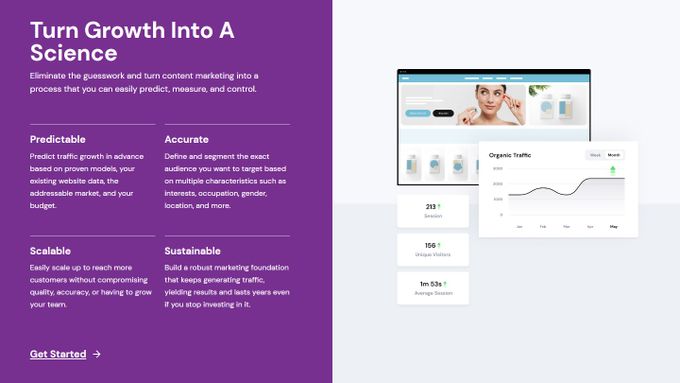
Working with a reputable platform like Entail AI won't just bring organic traffic. It will also help build brand trust and awareness, as well as establish authority. With Entail AI, you can even see accurate forecasts of your growth, allowing you to monitor your traffic growth in detail and predict future trends.
What Makes Entail AI Stand Out
- Wide Reach A content marketing platform like Entail AI gives you the ability to refine targeting and reach your specific audience.
- Expert Oversight Entail AI uses AI-powered solutions to automate processes prone to human error. Of course, all of these processes are overseen by a team of content experts and are thoroughly monitored.
- People-First Content Unlike the majority of online content, which is primarily focused on search engines and rarely helps readers, Entail AI has a people-first approach. This means that the search intent of your target audience will be precisely met.
Overview of Features
1. Content Strategy Development
Entail AI can assess your needs and develop a custom content strategy tailored to your goals. This includes keyword and competition research, as well as domain analysis and the creation of comprehensive pillar pages.
2. Full-Spectrum Content Management
In addition to developing your content strategy, Entail AI takes care of copywriting, editing, and optimization. Thanks to Entail AI's team of skilled editors, you'll always have highly optimized content with zero mistakes.
3. Expert Content Marketplace
What makes Entail AI stand out from the competition is its team of expert content writers. Every single member of the Entail AI team is an expert in their field, so they're aware of exactly what the reader is looking for.
4. Advanced Page Builder
Entail AI's content plan is not just limited to blog articles. You'll also get organic traffic from guides, community forums, Q&A pages, charticles, and more.
5. Search Engine Optimization
It's not enough to just generate high-quality content. You also need to make sure it's easily searchable by both the reader and the search engine. To do this, Entail AI uses a variety of SEO best practices, including keyword research, website structure optimization, internal linking, position tracking, and more.
6. Conversion Rate Optimization
Entail AI also makes sure that your content is converting. To do this, Entail AI uses a variety of CRO practices like A/B testing, tracking user behavior, and more. This allows business to maximize their conversions and increase their sales.
Entail AI Pricing
Entail AI doesn't have pre-defined pricing plans. Instead, it tailors the offer specifically to your content marketing needs. With that in mind, the Entail AI team will probably offer you the most cost-effective solution for your budget and help you get on track toward achieving your content marketing goals. So consider getting in touch with them for accurate pricing information.

Usability
Regarding usability, Entail AI makes it incredibly easy for you to start, as they handle all of the hard work for you. All you have to do is select your target audience and topics and then connect your site. From here, Entail AI starts automating your content management process by doing the following:
- Identifying customer interests by doing research and visualizing data
- Formulating an appropriate content strategy
- Assigning a team of writers that are experts in your niche
- Ensuring quality content via editorial review
- Optimizing content for search engines
- Monetizing your traffic by optimizing conversion rates
Of course, you can oversee the entire process, as Entail AI offers a dedicated customer interface, allowing you to see the results yourself.
Support
Entail AI is always available for its customers when there are any questions or uncertainties. As a content marketing platform, they aim for the swift resolution of any challenge your business encounters down the road, so you can be sure that they'll be here every step of the way.
Integrations
One of the best features Entail AI offers is its seamless integration with your business's website. The platform can be easily integrated with a variety of website builders and platforms, including:
- WordPress
- Wix
- WooCommerce
- Webflow
- BigCommerce
- Squarespace
- Weebly
- React
Why We Recommend Entail AI
We highly recommend Entail AI for businesses that want to take their content marketing to the next level. This is because Entail AI offers an all-in-one solution for content, from content generation by expert writers and editors to advanced strategy generation following SEO best practices. Moreover, a content marketing platform like this is widely applicable in various niches across diverse audiences.
Who Is It Best for?
- Businesses that need an all-in-one content marketing solution
- Entrepreneurs who want to maximize their website traffic and conversions
- Online marketers and content creators who are looking for a cost-effective solution
The Bottom Line: Is Entail AI Worth It?
All in all, we believe that Entail AI is worth it. It provides a comprehensive content marketing solution that can make managing your business a lot easier and take your sales to the next level. The platform is affordable, has scalable pricing, and comes with extensive customer support. With its advanced features and integrations, Entail AI is a great choice for businesses of any size.
It's also worth mentioning that, as a content marketing platform, Entail AI has one goal—to help your business succeed. You won't have to worry about any aspect of your content marketing. Entail AI guarantees that you'll always stay one step ahead of the competition.
Entail AI Review (2026): Pros & Cons, Features, and More

Recommended Reviews

Importify Dropshipping App Review: Features, Pricing, Alternatives, and More
Dropshipping is one of the fastest-growing e-commerce models right now. But sourcing, importing, and managing products to sell in your store is a time-consuming and daunting undertaking. With Importify, it's a one-click process that takes no time at all. Read on to learn how this automation tool can help you save a ton of time. ProsEasy to set upTakes care of order fulfillment for youIntegrates with a range of different CMS platformsAn Importify Chrome extension is availableAffordableConsNo live chat customer support1-day trial is very short Who Is Importify For? Importify is made for dropshippers who wish to drive traffic, quickly find high-converting products, all while automating a wide range of e-commerce procedures. Features of Importify Importify has a ton of noteworthy features including semi-automatic order fulfillment, an integrated research tool, and a whole heap more. We’ve listed some of the main ones below. Product Research Tool Quickly add high-converting products to your online store with Importify’s product research tool. This feature provides access to thousands of suppliers from around the world that you can easily integrate into your category pages. Product Customization Tool Edit and customize quickly and easily with Importify’s product customization tool. Change product page titles, edit prices, make variants, create product tags, specify shipping weights, and much more - all at the touch of a button. Order Fulfillment Tool Stop copying and pasting order details. Instead, make use of Importify’s semi-automatic order fulfillment tool and quickly fill customer orders with little to no effort. Importify Pricing Importify Free Trial: 1-day Basic Plan: $15/month Premium Plan: $28/month Gold Plan: $38/month Importify Integrations The wide range of integrations is one of Importify’s best features. Here’s a look at Importify’s extensive integration list: AmazonShopifyWixWooCommerceWalmartEtsyAliExpressJumpsellerAlibaba Cloud Importify Usability Importify is very easy to use. Setting up the tool does not take long, its user interface is simple to navigate, but best of all Importify makes many time-consuming dropshipping processes easy. The most noteworthy of these is its product import tool. It allows users to quickly and easily import products from a ton of different suppliers into your store with just a few clicks - including AliBaba, one of the world’s biggest collection of dropshipping suppliers. Importify Support Importify’s customer service is excellent. Find fast answers to your questions using the company’s Help Center portal or reach them via their contact page. One downside is they don’t yet offer their customers a live chat option. Although, Importify claims a live chat function is in the works and will be available to customers shortly. Alternatives to Importify As the dropshipping space is very competitive, there are many great alternatives to Importify. These include but are not limited to: OrdoroAutoDSNimble Drop ShipModalystPriceYakZendropuDroppyuDropshipOberloSalehooPlus, a whole heap more! The Bottom Line: Is Importify Worth It? Importify is a dropshipping tool that allows e-commerce merchants to import products from many of the most popular e-commerce-based CMS platforms - including an Importify Shopify app. It has a ton of noteworthy features and is a community-proven tool that is safe and very easy to use.
Simple Sample Data—Test Data Solution for Shopify Dev Stores
Generating sample data for your Shopify store is essential to ensure everything is running smoothly before launch. Without an extensive list of test data, your visitors could have a less-than-ideal experience. The more data you have to analyze the better, but generating large quantities of test data can be a long and tedious task when done manually. Even with Shopify's development store, you're limited to only using free or partnered apps, and you'll need to manually add each item and collection. Simple Sample Data is an app by Egnition that makes generating sample data as easy as a single click. The app can be used on both development stores and paid stores, where it will generate products with images, orders, customers, and smart and custom collections. ProsFree and paid versions availableSingle-click data generationCompatible with dev and paid storesOutstanding customer supportConsFree version only available for dev stores Who is Simple Sample Data Best for? Whether you're a website designer working on a new theme or store and need dummy data to run tests, or an app/theme developer who is tired of constantly manually importing CSV files into each new project, Simple Sample Data can help you: Add custom products and collectionsGenerate dummy ordersTest run your theme/app for issues before launchDelete test data with a single click Pricing Simple Sample Data has only two pricing options: a free version and a single, paid version. Both plans include all the features of the app and are only limited by where you can use them. Free PlanPrice: FreeFeatures: Access to allStore type: Only dev storesPaid PlanPrice: $0.99 (once-off)Features: Access to allStore type: Dev and paid stores Features Simple Sample Data was created to save developers and online store owners time by quickly and automatically generating test data for products, collections, and orders, thus saving time and effort. 3 Data Themes Three data themes that include images and full details are available to use which make development stores look and feel real. Clothing and brand products: Supports products with multiple variantsPaintings: Supports single product variantsToys and novelties: Supports single variant products. Streamlined Data Generation With a single click, Simple Sample Data will populate your store with test products, collections, and customers without the need to import CSV files manually. Once you're happy with your test, the data can be removed with another single click. Custom Options The app gives you full customization of the data that you wish to produce. You can choose to populate all the data, or simply generate customers, products and collections, or add orders. Furthermore, you can change the theme and customize your collections. Ease of Use Simple Sample Data is one of the easiest ways to generate test data for your online store. Because you don't need to upload CSV files, you will save valuable time. With a single click to generate or delete data, you don't need to be a developing expert to get the most out of this app. Although the app is relatively new, which limits the available reviews, Simple Sample Data still holds a 5-star rating on the Shopify app store. Customer Support Egnition is well known for their outstanding customer support, and have been praised time and time again. The Egnition team offers a 24/7 hour support channel, 365 days a year. To reach them you can simply make use of the dedicated support icon on each of their apps, or email them at [email protected]. Egnition apps are constantly updated as the team takes note of customer responses and takes measures to improve quality, usability, and customer satisfaction. Bottom Line: Is Simple Sample Data Worth It? If you're an app or store developer, or simply test running a new theme or online store, manually adding sample data can burn through your valuable time. Simple Sample Data takes all this work and turns it into a single click, thus providing you with extensive sample data, with little to no effort. Available both on the Shopify development store and paid stores, this app is a no-brainer.
HelloBrand Review—Shoppable Video Links for Shopify Merchants
If you're looking for a new way to market your products, then you should consider the simple concept of shoppable videos. Users are far more likely to retain the information they see in a video than in a mess of text scrawled across your website—so why not throw in a purchasing link and let them buy directly from the video? Keep reading to learn all the different ways that HelloBrand's shoppable video service can help your store. What Does HelloBrand Offer Shopify Merchants? More Effective Social Media Marketing Have an Instagram business account but aren't seeing the conversion rate you'd like? Reuse your product videos from any social media platform and embed them on your store as shoppable video carousels or floating videos on your homepage or product pages. Each video comes with a link that you can share on all your socials, emails, and SMSes to redirect users straight to the shoppable video, increasing your conversions. UGC With More Impact Every e-commerce merchant is familiar with the benefit of user-generated content in the form of product reviews and ratings. Now, with HelloBrand, you can turn your UGC product review videos into shoppable ones to improve the effectiveness of your social proofing apps. Live Video Shopping If you haven't started hosting live videos to promote your brand and engage with your community, then now is the time to start. And with HelloBrand's technology, you can add purchasing links to your live videos when discussing products, allowing you to remove any doubt and answer customer questions in real-time before they purchase. On top of that, you can save and reuse live videos as conversion-boosting shoppable videos on your store. HelloBrand Pricing The cost of running HelloBrand on your e-commerce store works a little differently from most other Shopify apps. Instead of a few strict plans to choose from, the app is free to install and remains so up to 200 monthly views of your shoppable videos. After that, it's only $0.02/view for the rest of the month. Additionally, if you're worried about your company growth costing you more in the long run, you don't need to worry. HelloBrand offers you the control to set a flat rate that you're willing to spend each month, whereupon the service will simply pause for the rest of the month once that limit has been reached. This ensures that you have the chance to test the app and only have to pay for what you get. Our Verdict: Should You Use HelloBrand? E-commerce store owners are always looking for new ways to improve their marketing and increase conversions, and shoppable videos are a simple and effective way to do so. And with the free-to-use capabilities that only require a small, custom payment after a certain number of views and the excellent customer support available 24/7, there's really no good reason not to try it out for yourself! It's clear that, from the 5-star reviews on the Shopify app store, other e-commerce merchants feel the same. Head to their website to learn more or jump directly to their Shopify app store page to get started.