
Layer Slider: A No-Code Solution to Fresh Sliders for Shopify Stores




Updated February 14, 2024
Our team tests eCommerce apps and publishes reviews that are unbiased and not influenced by payments we receive from some of the app developers.
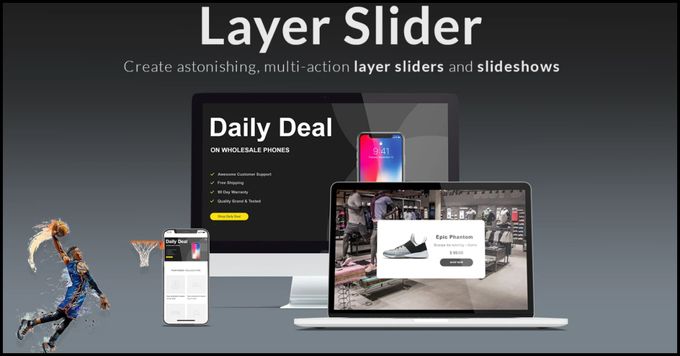
Keeping your website's content fresh and updated is crucial for engaging customers and driving sales. One tool that can help you achieve this is Layer Slider, a powerful plugin that lets you create eye-catching sliders quickly and easily without the need for coding experience. In this review, we'll take a closer look at the features of Layer Slider, its benefits, integrations, and pricing plans.
Layer Slider's Features
Layer Slider offers a range of features that make it easy to create stunning sliders that engage your customers. These include:
- Drag-and-Drop Customization The visual editor allows you to create sliders quickly and easily with no coding or prior experience needed. Your customization options are unlimited, with complete control over effects, transitions, and styles.
- Full Responsiveness Layer Slider automatically adapts to any resolution, working seamlessly across all devices, whether desktop, mobile, or tablet.
- No Coding Required Layer Slider's no-code technology makes it effortless to bring your ideas from concept to launch.
- Multiple Slider Types Layer Slider lets you create a variety of sliders, including image sliders, video sliders, content sliders, and more.
- CSS3 Transitions You can choose from a range of CSS3 transitions with JavaScript fallback to create dynamic and engaging effects.

Benefits of Layer Slider
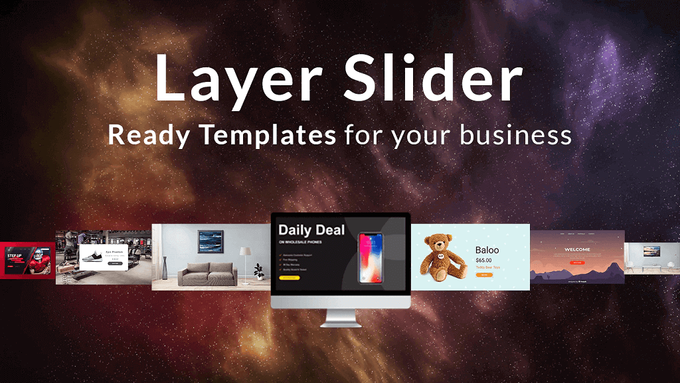
Using Layer Slider can help you:
- Increase engagement: Layer Slider's eye-catching animations and transitions can capture your customers' attention and keep them engaged with your content.
- Improve user experience: Layer Slider's responsive design ensures that your sliders look great on any device, providing a seamless experience for your customers.
- Promote your products: Layer Slider lets you showcase your products with rotating images, unique CTAs, and promotional content, making it easy to market your products effectively.
- Build trust: Layer Slider's testimonial slider can help you build trust with customers by showcasing positive reviews and testimonials.
» Improve your sliders' images with the best photo editing apps for Shopify
Pricing Plans
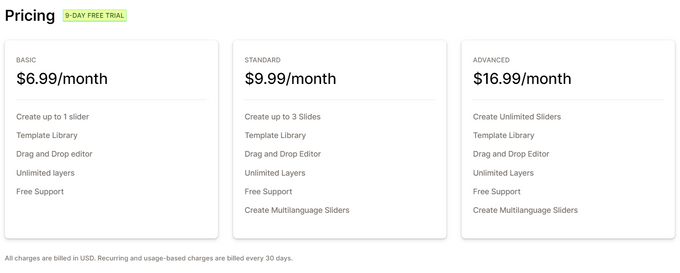
Layer Slider offers a 9-day free trial with three pricing plans available:
- Basic Plan ($6.99/month)
- Create up to one slider
- Template library
- Drag-and-drop editor
- Unlimited layers
- Free support
- Standard Plan ($9.99/month) This plan includes all the features of the previous plan, as well as:
- Create up to three slides
- Create multi-language sliders
- Advanced Plan ($16.99/month) This plan includes all the features of the previous plans, as well as:
- Create unlimited sliders
Integrations
Layer Slider offers seamless integration with a variety of popular platforms, allowing you to easily incorporate the plugin into your existing workflows and maximize your productivity. Some of the key integrations include:
- Shogun page builder: Use Layer Slider in conjunction with Shogun's powerful page-building tools to create stunning, customized web pages that showcase your products and services.
- Social media: Connect Layer Slider to your social media accounts, including Instagram, Facebook, YouTube, Vimeo, Twitter, and Flickr, to easily share your content and engage with your followers.
Our Verdict: Should You Use Layer Slider?
Layer Slider is a great option for those looking to create custom sliders without any coding experience. With its drag-and-drop editor, custom effects, and responsive design, you can create professional-looking sliders with ease. Plus, with a 9-day free trial and live chat support available, it's easy to give Layer Slider a try and see if it's the right fit for your website.
Layer Slider: A No-Code Solution to Fresh Sliders for Shopify Stores

Recommended Reviews

Multi‑Location Inventory Info for Shopify: E-Commerce Inventory Management
Are you tired of not being able to tag your products based on availability and location? Then consider using a service that can solve all your e-commerce inventory management needs, like the Multi‑Location Inventory Info app by Kark Ltd. Indispensable for product pages, this app displays the exact quantities or a "high stock"/"low stock" message based on a threshold. For non-English stores, users can alter the wording, and there are comprehensive customization features with unique styles to complement any shop theme. In addition to this, Multi‑Location Inventory Info is compatible with mobile devices. ProsWorks for wide range of demographic locations14 Day free trialLots of customization optionsExcellent customer serviceConsNo free planSome users may experience compatibility issues Key Features of Multi‑Location Inventory Info Stock Availability at Each Location Show stock availability, amount, and/or a "high stock"/"low stock" message based on the quantity at your retail location. You also have the ability to block purchases from countries where an item is not in stock. Collect by Clicking On product pages, inform your customers about the availability of click and collect. Utilize Shopify's smart collection functionality to build a collection of things that are only available at a given location, or use tag filtering to offer "filter by location" features with auto-tagging. Collection Depending on Location Use the smart collection functionality to present all items available at a place and auto-tag products depending on location availability. Other Noteworthy Features The app is ideal for retailers who use Shopify's various locations or local pick-up options.You can display stock numbers of items specifically for the location linked to a client by using the "Associate a customer to location" function.Using the app's APIs, you can display stock amounts on quick-view pop-ups and featured products.The app has a responsive help center that provides speedy assistance and support. Pricing Display Plan $5.99/month This plan includes the following features: Unlimited productsInventory information on product pagesAdvanced style customization Display+ Plan $9.99/month This plan is for merchants using Shopify Plus and includes all the features from the Display plan. Multi‑Location Inventory Info Customer Reviews Customers all confirm that the app is simple to get up and running, doesn't require any code, and is easy to configure. The app comes with a risk-free 14-day trial period, and should you have any queries, the support center will attend to it quickly. Multi‑Location Inventory Info currently has a 5-star rating on the Shopify app store and is used by over 250 merchants. To see if Multi‑Location Inventory Info is suitable for your shop, visit their website and try out the demo.
DataChamp Excel & CSV Exports: Shopify Reporting Made Easy
Eliminate time-consuming and inconvenient reporting with DataChamp Excel and CSV Exports. Customized exports for suppliers, dropshippers, and business partners are now readily available. These exports are imported into IT systems, allowing them to complete business activities or generate reports so you can better understand your operations. Why You Should Use DataChamp Export in One Click A massive perk of using DataChamp is the one-click export. With the user-friendly UI, orders, goods, customers, meta fields, and other data are effortlessly exported to Google Sheets, Dropbox, FTP, or email. Readily Automate Your Processes DataChamp makes it easier to optimize your exports with programmable conditions (If X in column A, then Y in column B). Delivering your exports can be scheduled daily or hourly, and you can use incremental exports to save time. And, you choose any Shopify field using DataChamp. Adapt your export to the needs of your suppliers, IT systems, or team. Use formulae, filters, and conditions to your advantage. Other Notable Features Select from several pre-made templates.Every aspect of your export may be adjusted (including sophisticated settings for CSV and Excel files), and you have unlimited storage.Action on a large scale: Select specific orders.Special characters, such as umlauts ö, ä, ü, and others, are used for non-English countries.Legacy file encodings include ASCII, Windows-1252, and UTF-8.Custom column mappings, variables, and the evaluation of mathematical expressions are all available. Pricing Free Plan This plan includes the following: Dropbox, FTP, Google Drive/Google Sheets, and emailEach export can have up to 10 linesReport templates are limitless Basic Plan $9.95/month This plan includes all the features of the previous plan, as well as the following: Unlimited number of schedulersEach export can have up to 1000 linesFree setup by a professional Professional Plan $24.95/month This plan includes all the features of the previous two plans, as well as the following: Exports are done in stagesEach export can have up to 10000 linesRequests for new features are given priority Our Verdict: Should You Use DataChamp Excel and CSV Exports? With only one click, you can easily evaluate and share your findings. Using DataChamp, merchants can connect Shopify to other IT systems and partners. You may use calculations, mappings, and a range of other features to build a successful data integration. Over 600 shops use DataChamp every day, and the app has an impressive 5-star rating on the Shopify app store. To learn more about DataChamp Excel and CSV Exports, visit their website or download the app from the Shopify app store.
Vajro App Review (2026): Features, Pricing, Support, & More!
Over 58% of online traffic comes from mobile devices globally. What's more, 54% of all e-commerce purchases are made using a mobile app. It's clear that online retailers who don't have a mobile app are putting themselves at a major disadvantage. But building a mobile app is not a simple task, and many merchants struggle due to a lack of coding skills, time, or money to hire developers. Fortunately, Vajro is here to address these issues. Vajro is a tool that helps merchants create stunning mobile apps for their online stores without needing coding or design skills or paying the high price of a Shopify expert. We explore key aspects of the app, like its features, integrations, and pricing plans and weigh its pros and cons to help you determine if it's the right app for your needs. ProsEasy-to-use & intuitive UIFree trial & demo availableHighly customizable24/7 expert & responsive supportMulti-language & currency optionsSeamless integrations with popular toolsConsNo free planUpper-level plans can be expensive for smaller stores Best For Vajro is a valuable app for any size or type of e-commerce store looking to improve their customers' mobile shopping experience. It's an excellent choice for merchants who experience issues with their payments page, navigational bugs, or slow store loading times. Installing and using the app is simple and accessible to retailers who don't have coding knowledge or much technical expertise. Vajro offers four plans that accommodate different-sized businesses, from early-stage startups to established Shopify Plus stores. You can choose the plan that fits your budget and needs and scale up as your business grows. Overview of Features Live Videos One of the most unique and exciting features of Vajro is the ability to live-stream videos and let your customers buy in real time. Vajro is the first and (at the time of publication) the only Shopify app that offers this functionality. Live videos can help you target impulse purchases and increase conversions. You can also broadcast from multiple channels, such as Facebook, Instagram, YouTube, or your own website, and showcase your products in action. Push Notifications Another way to boost your sales and engagement is to use push notifications. Vajro lets you set up personalized behavior-based triggers that send relevant messages to your customers. Among others, you can send welcome, back-in-stock, abandoned cart recovery, sales, and discount notifications. You can also make your notifications more attractive and interactive by adding images, emojis, GIFs, and videos. Customizable Themes Vajro allows you to customize your app's look and feel with four built-in industry-appropriate themes. You can choose the theme that suits your brand and niche and then tweak it with a simple drag-and-drop editor. You can customize the color scheme, fonts, images, banners, product sliders, product and image grids, and more. The best part: you don't need any coding skills to create a stunning app that reflects your brand identity. Smart Search With a smart search feature, Vajro helps your customers easily find what they're looking for. Your customers can use image search to find products that match their preferences. You can also display related keywords on the search bar to help them refine their queries. Additionally, you can provide intelligent recommendations based on their browsing history and purchase behavior. Multi-Language & Multi-Currency Support Reaching a global audience has never been easier with Vajro. This impressive app supports up to 18 languages, enabling you to serve customers from all around the world. Plus, its support for 82 currencies means customers can shop in their local currency without hassle. You don't need to install any additional apps for currency conversion or translation. Analytics Vajro offers a comprehensive analytics dashboard for optimizing app performance. This feature provides you with a visual display of various metrics, including downloads, active users, revenue, and retention rate so you can monitor your app's success. In addition, detailed reports are available for your live videos, encompassing metrics such as views, likes, and comments—all to gain insights into customer behavior to make data-driven decisions that improve app quality. » Looking to take your analytics to the next level? Check out our top-rated analytics apps Plans & Pricing Vajro has four paid plans, and they offer a 30-day free trial and a 10% discount on annual subscriptions. How much to send on apps can vary substantially, and, as you can see below, Vajro's pricing plans differ a lot in terms of their features and costs. Starter This plan is ideal for early-stage businesses with a monthly fee of $99. Features include a native Android and iOS app, 10 push campaigns per month, deep linking, live video selling, app-only discounts, and WhatsApp and Facebook Messenger integrations. Core The Core plan is designed for small-sized businesses for $249 a month. It has everything in the Starter plan, plus 50 push campaigns, international selling with dual language and dual currency, Apple Pay integration, and custom product options. Premium This is a good fit for fast-growing businesses but comes with a monthly fee of $499. The Premium plan contains everything in the Core plan, plus unlimited push campaigns, wholesale features with product and price lock, native blogs, and a quarterly business review. Plus The Plus plan is suitable for high-volume and Shopify Plus brands with a monthly cost of $999. It comes with everything in the Premium plan, plus custom development, dedicated key account managers, and CleverTap and Klaviyo integrations. Integrations Vajro is not only a powerful mobile app builder for Shopify but also a versatile integration platform. It supports all major Shopify plugins and premium Shopify integrations. This means you can seamlessly connect your mobile app with your tools and platforms of choice to enhance your store's functionality and performance. Vajro offers over 70 integrations, which is the most for a mobile app builder on Shopify. These integrations cover various categories, such as: Loyalty apps: Reward your customers for their purchases and referrals by integrating apps like Smile.io.Product review apps: Showcase your customer feedback and ratings with Yotpo and other leading social proof apps.Marketing automation apps: Send your customers personalized emails, SMS, and push notifications with integrations like Klaviyo.Alerts apps: Notify your customers when products are back in stock, on sale, or low in inventory with the Back in Stock app.Buy-now-pay-later apps: Increase conversions and average order value by offering flexible payment plans to your customers with Klarna.Search & filter apps: Enhance your app's search and filter functionality with a Fast Simon integration.Analytics apps & platforms: Track and optimize your app's performance and user behavior with tools like Google Analytics.Translation apps: Reach a global audience by translating your app into different languages with Weglot. Usability Setting up an app for your Shopify store can be daunting, but with Vajro, you can create an app that looks great and works well without breaking a sweat. You can create and customize your app in no time. In fact, you can go from start to finish in under an hour thanks to its easily customizable templates. You also don't need any coding knowledge to use Vajro, and the drag-and-drop editor is easy enough for beginners to master. The user interface is simple and intuitive, and the analytics dashboard is clean yet comprehensive. Support When it comes to Vajro's standout characteristics, their support truly sets them apart. With 24/7 availability via live chat or email, Vajro ensures customers can reach out whenever necessary. For those looking for a more immediate response, the Plus plan comes with priority support and a dedicated customer success manager. Vajro also equips users with many resources to become proficient in using the app effectively, including: Live & on-demand webinars: These assist you in learning more about their product and how to utilize it efficiently.Vajro blog: With more than 200 posts about e-commerce and mobile apps, you'll find essential tips and tricks to help you expand your business.E-Books: These are free to download from their website. They cover a variety of topics, including mobile commerce, app design, and marketing strategies.Help docs: If you need assistance with a specific feature or issue, you can consult their help docs, with over 80 articles covering everything from app setup to customization. Monetize on Mobile Shopping With Vajro If you're looking to increase customer lifetime value (CLV), then you need to be where your customers are—on their mobile devices. A mobile app can help you improve customer experience, engagement, and loyalty and boost sales by offering a fast, convenient, and personalized way to shop online. With Vajro, you can create your own professional mobile app for your Shopify store without spending a fortune on developers. » Vajro is just one tool to boost sales. Take a look at more of our best apps to increase sales