
Shopify Single Sign-On (SSO): Improve Your Customers' Login Experience




Updated February 13, 2024
Our team tests eCommerce apps and publishes reviews that are unbiased and not influenced by payments we receive from some of the app developers.
In today's e-commerce landscape, conducting business on the cloud and using third-party services is the norm. As a result, users expect seamless and frictionless access from anywhere, anytime, and with any device. This is where single sign-on (SSO) login capabilities come into play.
In this post, we will explore the benefits of Shopify Single Sign-On by miniOrange, an app that provides a solution to ensure an easy, secure, and efficient login to a Shopify store using a single set of credentials, all within minutes.
Benefits of Shopify Single Sign-On
Shopify sellers often have multiple e-commerce platforms in their business architecture. Using the Shopify Single Sign-On app, users can effortlessly log in to any of these platforms with a single set of login credentials. This eliminates the need for customers and employees to memorize different credentials for multiple applications, leading to increased staff productivity and user experience.
Moreover, the app restricts users based on their behavior, like device location, time of access, the device used to access, etc., which helps prevent spammers from targeting and accessing your store.

App Features & Integrations
1. Multiple Identity Providers (IDPs)
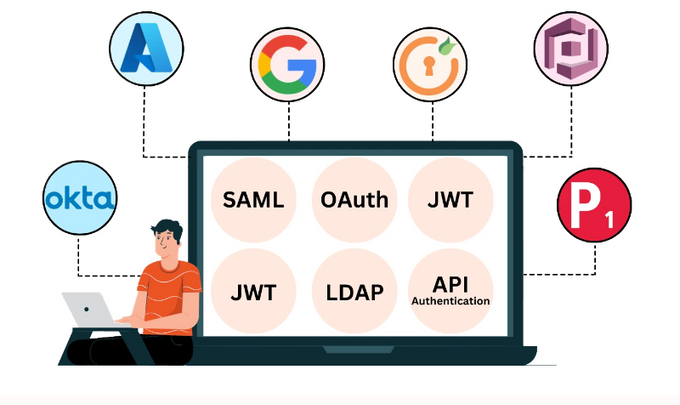
The app supports multiple identity providers, including:
- Azure AD & Azure AD B2C
- Amazon Cognito
- Okta
- miniOrange
- PingOne
- Google Apps
2. Shopify Store as IDP
Configure your Shopify Store as an identity provider and allow users to log in to any CMS platform or website using their Shopify credentials. Enable seamless single sign-on for multiple Shopify stores using one of them as the identity provider.
3. Attribute Mapping
Attribute mapping allows the service provider to retrieve the necessary information from the identity provider and apply it to the user's account in the service provider. With Shopify Single Sign-On, you can assign user roles and map user attributes from the identity provider to the service provider (SP) during authentication.
4. Supports All Standard Authentication Protocols
This includes the following:
- SAML 2.0
- OAuth 2.0
- OpenID Connect
- JWT
- LDAP
- API authentication
5. Security Features
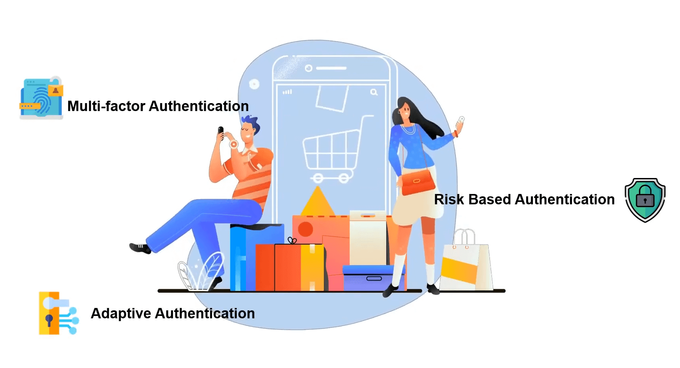
The app has robust security features that protect against fraud and unauthorized access. It can be customized to meet the specific security needs of the business, and it complies with PCI DSS, GDPR, and HIPAA. The app also provides multi-factor authentication (MFA), customizable login widgets, and custom requirements.
6. Other Features
- Compatible with Shopify Headless Stores and Hydrogen Framework
- Mobile SSO integration
- Restricts users from using multiple devices to access the store during SSO
- Restrict content on SSO
- Easy user management to delete & update used data in real time
- Offers discounts based on customers' tags
Pricing Plans
Shopify Single Sign-On is available to both Shopify Plus and non-Plus businesses at affordable, industry-specific (B2B or B2C) price points.
For B2C Businesses
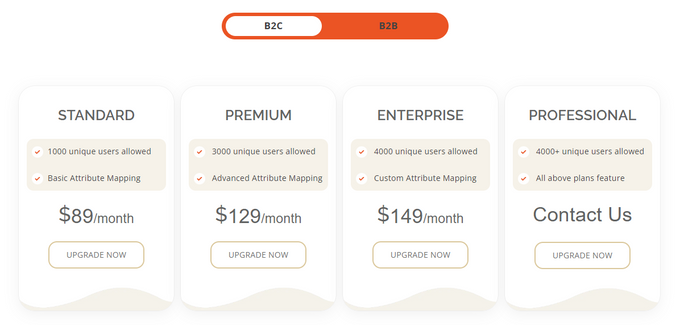
Features such as unlimited SSO user creation, account linking, a fully customizable login widget, and more are included in all four payment tiers. However, each plan has its own unique elements:
- Standard Plan ($89/month)
- 1,000 unique users
- Basic attribute mapping
- Premium Plan ($129/month) This plan offers all of the Standard Plan's features, as well as:
- 3,000 unique users
- Advanced attribute mapping
- Auto redirect to IDP support
- User JWT after authentication
- Enterprise Plan ($149/month) This plan offers all of the features of the previous plans, as well as:
- 4,000 unique users
- Advanced attribute mapping, including metafields
- Auto update user profile
- Domain-based restriction
- Session persists over 24 hours
- Auto-tagging
- Professional Plan (requires contacting the developers) This plan offers all of the previous plans' features, as well as:
- 4,000+ unique users
- Custom advanced attribute mapping
- Fraud prevention based on IP, device, location, and time
For B2B Businesses
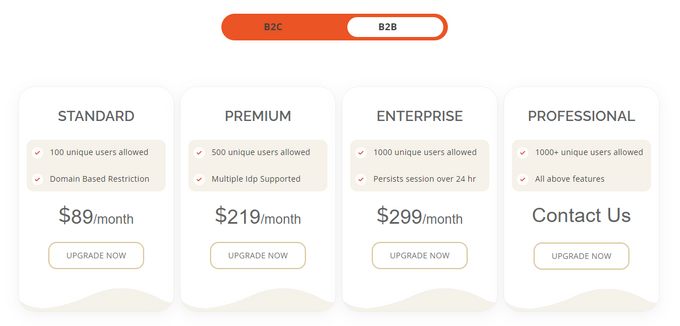
Most of the available features, from auto-tagging and account activation to domain-based restriction and customizable login widget, are included in all four pricing options. However, there are a few that are specific to each plan:
- Standard Plan ($89/month)
- 100 unique users
- Basic Attribute mapping
- Premium Plan ($219/month) This plan offers all of the Standard Plan's features, as well as:
- 500 unique users
- Advanced attribute mapping
- Multiple IDP supported
- User JWT after authentication
- Enterprise Plan ($299/month) This plan offers all of the features of the previous plans, as well as:
- 1,000 unique users
- Advanced attribute mapping, including metafields
- Redirect endpoint and single logout endpoint (SLO)
- Session persists over 24 hours
- Professional Plan (requires contacting the developers) This plan offers all of the previous plans' features, as well as:
- 1,000+ unique users
- Custom advanced attribute mapping
Support & Ease of Use
Integrating Shopify Single Sign-On by miniOrange is a straightforward process that can be completed in minutes.
The app has a dedicated 24/7 customer support team that responds to queries and troubleshooting. Alternatively, you can contact them at [email protected].
Final Verdict: Should You Use Shopify Single Sign-On?
Shopify Single Sign-On by miniOrange is an app that provides a seamless and secure login solution for Shopify store owners and their customers. It eliminates the need for multiple credentials and restricts unauthorized access. It supports various authentication protocols, attribute mapping, and security features compliant with industry standards. The app is available at affordable price points for both B2B and B2C businesses, and its integration is easy with 24/7 customer support.
If you're interested in trying the app, you can visit their website to learn more or start your 15-day free trial.
Shopify Single Sign-On (SSO): Improve Your Customers' Login Experience

Recommended Reviews

ReConvert App Review - Features, Pricing, Support, & More!
Upselling and cross-selling are essential strategies for increasing revenue and conversions in a highly competitive e-commerce market. They improve overall customer experience by offering personalized product recommendations, which can increase the average order value (AOV) of your online store and help your business grow. ReConvert Upsell & Cross Sell is a post-purchase app designed for upselling and conversion. You can create thank-you pages, pop-ups, buttons, widgets, and a number of other checkout and post-purchase funnels to help increase sales. The app is easy to use with straightforward drag-and-drop functionalities and also offers a bunch of analytics tools to keep track of sales data and store performance. » Improve your store's page design even more with the best Shopify landing page builder apps ProsEasy to set upNo changes to Shopify store checkout functionsLarge library of widget optionsFree pre-made templatesOne-click upsellsExtensive analytics dashboard and functionsFree for development storesConsLimited monthly orders per month What Is ReConvert Best for? ReConvert is best for Shopify store owners looking to increase their sales revenue and conversions by offering upsell and cross-sell opportunities to their customers. ReConvert offers a range of customizable templates which can be tailored to specific products or collections and can include discounts or other incentives to encourage customers to purchase more. The app also provides detailed analytics on the performance of upsell and cross-sell offers, including conversion rates and revenue generated, so store owners can track the success of their campaigns and optimize their offers over time. Overview of Features Thank-You Pages: ReConvert allows you to create amazing custom thank-you page templates for upselling to your customers after purchase without changing your Shopify checkout page.Upsell and Cross-sell: You can cross-sell and upsell your customers with multiple features like product recommendations, timer pop-ups, reorder widgets, product upsell, and a lot more.Triggers: ReConvert allows you to use triggers to display different thank-you pages that have different offers according to the product's properties, customer, and order. With this, you can show the right offer to each customer and ensure that your conversion rate remains high.Gather Customer Data: You can collect customer information such as product comments, post-purchase survey answers, and birthdays to personalize their shopping experience and implement any important feedback.Powerful Integrations: By integrating with the right third-party apps, you can enhance your store and display smart product recommendations, send automated birthday campaigns, and showcase product reviews.Analytics: ReConvert's analytic section displays your store's real-time performance. Using this, you can ensure that all your widgets are doing well and you're getting a positive ROI. » Check out the best analytics apps Shopify has to offer Plans & Pricing ReConvert pricing plans are usage-based. Each plan has a monthly order limit plus a 0.75% commission on extra revenue you generate because of the app. All of the pricing plans include all of the features, such as one-click upsells and checkout, post-purchase funnel, and thank-you page editors. Finally, ReConvert also offers a 30-day free trial. Free Plan: The free plan is only available to development stores.Upsell Basic Plan: Up to 49 total orders per month for $4.99.Upsell Premium Plan: Up to 99 total orders per month for $7.99.Upsell Premium Pro: Up to 199 total orders per month for $14.99. If you have more than 199 orders per month, you can view ReConvert's pricing page for more options. Integrations ReConvert offers a wide range of integrations with popular third-party apps to help you optimize your store's upsell and cross-sell strategy and enhance your customer's shopping experience. See below for a list of the best Shopify apps which offer integrations: SMSBumpMailChimpLooxKlaviyoWiser RecommendationsJudge.meAli ReviewsStamped.ioRebuySMS notifications Usability The app's designed to be user-friendly and easy to navigate with a clean and intuitive dashboard, making it easy for merchants to create and manage their upsell and cross-sell offers. To create an offer, merchants can choose from a variety of templates and customize them with their own images, text, and product recommendations. ReConvert also includes a drag-and-drop builder, which allows users to easily rearrange the layout of their offers and streamlines the upsell and cross-sell process without the need for any technical expertise. Support The app offers 24/7 customer support via email and live chat for all plans. It also provides in-depth documentation of all widgets and features in the app's helpdesk portal. The documentation is inclusive of explanatory videos, screenshots, and text. Users can also find a knowledge base and FAQs to help troubleshoot common issues and questions on their own Will ReConvert Help Your Business Convert? ReConvert can be a valuable tool for Shopify store owners looking to increase their sales and improve conversion rates. It's user-friendly, requires no coding skills, and has a range of customization options to suit your business needs. It also offers seamless integrations with some of the best and most popular apps on Shopify for even more business growth potential. Overall, ReConvert is almost certainly going to help with increasing sales and conversions; however, be aware that with increased sales come increased costs since the app includes a commission on extra revenue generated from using the app. So, make sure that your store's margins and pricing are calculated appropriately.
SmartrMail Review—Pricing, Support, Features, and More!
Are you looking for an easy way to increase sales for your e-commerce brand? Look no further than SmartrMail Email Marketing. In this review, we'll take a deep dive into the features, pricing, and usability of SmartrMail, so you can decide if it's the right email automation tool for your business. What Is SmartrMail? SmartrMail is an email automation tool that allows you to create effective automated emails that drive sales. Whether you're looking to send welcome emails, post-purchase campaigns, abandoned cart emails, or other types of email campaigns, SmartrMail has you covered. Best for This app is best for both e-commerce brands who are looking to improve their sales via abandoned cart messaging, welcome emails, and post-purchase emails or businesses simply seeking to automate their email processes. ProsEasy to use and free migration supportMany automations to choose from100+ premade templatesDrag-and-drop editor15-day free trialConsGetting quality support costs moreThe pricing can be steep, especially for larger email lists » Engage your customers with the best Shopify apps with email templates SmartrMail Pricing SmartrMail provides a 15-day free trial. Once it's done, the following monthly plans kick in: Free PlanUp to 250 subscribersUp to 1,250 emails monthlyEmail newslettersUnlimited automationsAI engineAdvanced segmentationPop-ups100+ templatesLive chat supportStandard Plan ($19/month plus an additional $0.0075 per subscriber monthly)Easy email newslettersUnlimited automationsAI engineAdvanced segmentationPop-ups100+ templatesLive chat supportA sending limit of 12x your email list size per monthUnlimited Plan ($99/month plus an additional $0.01 per subscriber monthly)Everything in the Standard PlanFree complete automation design & setupUnlimited emailsBrowse abandonment seriesFacebook audience syncSmart A/B testingPriority support Features 1. Customizable & Professional Email Templates When you set up SmartrMail, it generates an email template that matches your e-commerce store design, inclusive of your brand logo. The app also offers an HTML and a WYSIWYG (what-you-see-is-what-you-get) editor. You don't have to bother about your email design, just include your content and send it. 2. Unintrusive Pop-ups With SmartrMail, you don't need an additional pop-up app. It allows you to choose where and when your pop-ups appear so that you can avoid irritating your customers with irrelevant messages. 3. Segmentation The app provides a deep Shopify integration to create automation and segments based on your customers' purchase behavior. Integrations SmartrMail integrates with several Shopify third-party apps, including: Wisepops: SmartrMail's integration with Wisepops allows you to create targeted pop-ups and capture email addresses directly from your website.Sumo: With the Sumo integration, you can create and A/B test various email opt-in forms to increase your subscriber list and ultimately drive more sales.Justuno: Justuno provides powerful conversion rate optimization tools, and integrating with SmartrMail allows you to create personalized email campaigns that will help you convert more visitors into customers. » Grow your sales with best email marketing apps for Shopify Usability & Support SmartrMail is very easy to use and offers free migration services to make the process even smoother. However, support is based on your plan, so you may need to pay more to get access to quality support. Elevate Your Email Marketing With SmartrMail Overall, SmartrMail is a great tool for e-commerce businesses looking to improve their sales via automated email campaigns. While the pricing can be steep, the many features and automations available make it a worthwhile investment for businesses looking to streamline their email processes. Sign up for SmartrMail's 15-day free trial and see how it can boost your sales today. » Discover the benefits of email marketing
UpPromote Review (2026): Pricing, Features, Integrations, & More!
The global affiliate marketing industry is worth more than $17 billion, with 20% of brand marketers reporting that affiliate marketing is their leading customer acquisition channel. What exactly is affiliate marketing? It's a performance-based marketing strategy where the online retailer pays a partner—or affiliate—a commission for driving traffic or sales to their store. But starting and running an affiliate program is not a simple task. Business owners have to find the right affiliates, monitor and track their performance, manage complicated commission payments, and more. UpPromote is one of Shopify's top apps for affiliate marketing, providing a selection of tools and features to help e-commerce merchants start and manage effective affiliate marketing campaigns. Our review includes a description of UpPromote's features, benefits and shortcomings, pricing structure, and other info to help you decide whether this is an app worth investing in for your e-commerce store. » Sales-boosting tools come in various forms. Check out some more leading sales apps Best For UpPromote is a useful app for any Shopify store owner looking to launch or run an affiliate marketing program. It's suitable for most types of retail and small, medium, and large businesses alike, as it has a variety of customization options. UpPromote also has several plans to choose from, so you can get the services you need to suit the size and complexity of your affiliate program. ProsRobust analytics toolsIntegration with major e-commerce platformsCustomizable affiliate campaignsUser-friendly interfaceConsHigher pricing than some competitorsFree plan is limited What's more, the Enterprise Package can be tailored to your exact needs, but you'll first need to get in contact with the UpPromote team to discuss the logistics and pricing. Overview of Features Affiliate Recruitment To find affiliates, UpPromote uses a referral link creation tool and an affiliate referral form that you can tailor to your needs. They also boast the UpPromote Marketplace, providing a community of affiliates who can be contacted directly to sign up for the program. With the app, you can also effortlessly create a customizable rewards and discounts system to encourage customer referrals. Campaign Customization You can use UpPromote to easily customize your marketing program to suit your requirements. Choose from a variety of themes, visuals, content, and targeting choices to make your campaigns unique. What's more, the registration page, affiliate account, email templates, affiliate links, and promotional resources can all be customized. You can even run A/B testing using UpPromote to find the campaign variants that work best. Campaign Management UpPromote's campaign management function makes it simple for users to control their affiliate marketing programs. Users can select commission rates, create various coupons and links, and monitor the effectiveness of their campaigns in real time. The platform offers email and in-app chat for communicating with affiliates and distributing marketing materials to them. It also provides tools for automating campaign tasks and processes. Rewards & Payments Programs Merchants can encourage their affiliates to maximize their marketing efforts thanks to UpPromote's rewards scheme. To motivate affiliates to work more and earn more, the program offers various reward categories, including bonuses and gifts, depending on performance and sales. The commission structure can be calculated and implemented automatically, and you can also pay affiliates automatically through PayPal using a personal or business PayPal account. Analytics Tools You can track your team's performance and make strategic decisions with UpPromote's robust analytics and reporting tools. You can easily see how your team is doing and pinpoint areas for development with the help of in-depth data on clicks, orders, sales, and commission. Additionally, you can quickly check the top performers and most frequently recommended products thanks to the report's convenient visuals and graphs. » Take a look at these great analytics apps if you want further business insights Plans & Pricing To meet the demands of different businesses, UpPromote has four distinct pricing tiers, with one free plan and three paid plans to choose from. UpPromote offers a 14-day free trial and a 17% discount on annual subscriptions. Free The Free Plan comes with configurable affiliate signup forms, tracking via affiliate links or coupons, automatic email templates, marketplace listing, analytics, and multilingual support.Growth The Growth Plan offers tools for turning customers into affiliates, discovering affiliates on the market, managing several programs, receiving payments using store credit, and chatting with affiliates. Professional The Professional Plan has features like multi-level marketing, product analytics, auto-generating coupons, auto-tier commission, and more than 10 other features. Enterprise The Enterprise Plan offers unlimited referrals, multi-store support, Partial.ly integration, and custom development, in addition to everything in the Pro plan. Integrations The app integrates with several popular platforms and apps, including: PayPal: With PayPal, you can pay affiliates directly and automatically.Partial.ly: This integration allows you to easily track orders that have been partially paid.Email Services: You can sync your affiliate list with your Klaviyo, MailChimp, or Omnisend account for more effective email marketing campaigns.Subscription Order Services: You can track your subscriptions more efficiently from Appstle Subscriptions, Recharge, or Bold Subscriptions.Shopify Apps: These include EPROLO, GemPages, PageFly, ReConvert, Transcy, TinyIMG, SEO Booster, AVADA, and several others. Usability On the whole, UpPromote is flexible and user-friendly, with an intuitive and easy-to-navigate interface. It interacts well with well-known platforms, payment systems, and apps. Setup was a breeze for us, taking only a few minutes. What helped the installation and setup process was well-structured onboarding tools and a checklist to get started. No coding or specialized tech knowledge is needed for the setup and use of the app. One point to consider is that there are a wide variety of settings to choose from, so it might be a slight learning curve for those who are new to affiliate marketing. Support The support offered by UpPromote is substantial and definitely met our needs as new users of the app. There is 24/7 live chat support, although there may be a waiting time. Having said this, the Enterprise Plan comes with prioritized support, so customer service is almost immediate. In addition to this, UpPromote offers a sizeable resource library that includes articles, blogs, and video tutorials. There is also a YouTube channel with instructional videos and a dedicated Facebook community. Up Your Marketing Game With UpPromote With a variety of features, integrations, and pricing options to fit businesses of all sizes, UpPromote is a potent affiliate marketing management tool. It's a fantastic solution for stores trying to grow their affiliate programs because it has easily configurable and manageable campaigns, extensive customization options, and in-depth analytics. The platform's usability and feature set make it a good option for businesses looking to step up their marketing game, but you may want to consider opting for a paid plan to get the most out of the app. » Looking for more ways to rev up your marketing? Take a look at these top marketing apps